Image Tools
Midjourney or Ideogram: Which AI Image Tool Fits Your Creator Workflow?
Midjourney vs Ideogram for creators: compare text accuracy, style, pricing, privacy, and workflow fit before choosing your tool.
If you are weighing midjourney vs ideogram for creators, start with the asset you need to ship. Midjourney is still the stronger choice when style, texture, and cinematic mood matter most, while Ideogram is usually the more practical pick when your image needs readable text, fast campaign variants, or poster-style composition.
That split sounds simple, but it matters. A YouTube thumbnail, a newsletter header, a merch mockup, and a course worksheet do not ask the same thing from an AI image tool.
| What you see | Likely cause | First move |
|---|---|---|
| Gorgeous image, broken words | The model is prioritizing style over typography | Try Ideogram for the text-first version, then refine styling |
| Clean text, flat art direction | The prompt is too literal or the style target is weak | Use Midjourney for mood exploration, then recreate the winning concept |
| Too many one-off looks | No prompt system or reference routine | Save reusable prompt blocks for brand, lighting, palette, and aspect ratio |
| Good tests, messy publishing flow | Tool choice is not tied to the final channel | Pick by output: thumbnail, social graphic, mockup, banner, or ad concept |
Midjourney vs Ideogram for creators: the quick verdict
Choose Midjourney when the image has to feel premium before it has to explain anything. It is especially strong for stylized campaign concepts, moody YouTube thumbnails, editorial art, fantasy or product-adjacent scenes, and visual worlds where texture does a lot of the selling.
Choose Ideogram when the deliverable includes words inside the image. Think quote cards, poster headlines, merch concepts, ebook covers, thumbnail text tests, product labels, and social graphics where a misspelled word ruins the asset.
Where Midjourney wins for creator work
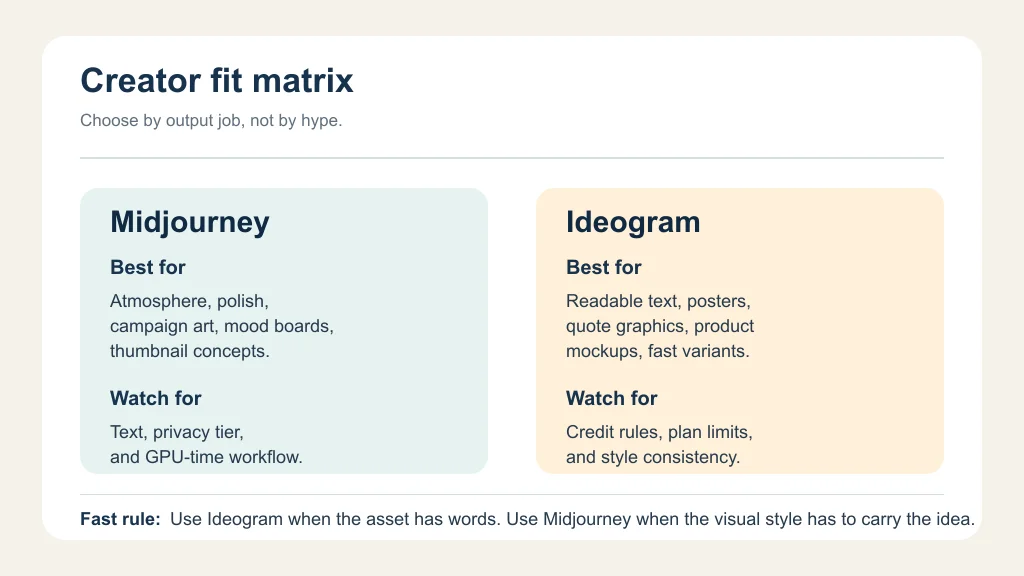
Midjourney is the better visual exploration tool when you care about taste. Give it a strong art direction, a clear subject, and a channel-specific aspect ratio, and it can produce images that feel less like templates and more like campaign concepts.
That is useful for creators who need a recognizable visual identity. A course creator can test cover directions. A YouTuber can explore thumbnail moods before adding text elsewhere. A newsletter publisher can build a repeatable header style without starting from a blank canvas every week.
Midjourney's plan structure also matters for production rhythm. Its official plan comparison says Standard, Pro, and Mega plans include Relax Mode for unlimited image generations, while Stealth Mode is limited to Pro and Mega. If privacy is part of your workflow, do not treat that as a tiny detail.
Where Ideogram is the cleaner pick
Ideogram earns its place when words are part of the image, not something you add later in Canva or Photoshop. That makes it practical for creator assets that need a title, slogan, label, callout, or short phrase baked into the visual.
Posters, Pinterest pins, printable worksheets, merch mockups, and quote graphics are the obvious examples. You still need to proofread everything, because no image model deserves blind trust, but Ideogram usually gives you a better first draft for text-led work.
Ideogram's docs also frame the product around credits. Free accounts get weekly Slow credits, while paid plans add Priority credits and premium features such as private generation and image upload, depending on tier. That credit model is worth checking before you build a daily publishing routine around it.
The creator workflow test I would run first
Do not compare the tools with one beautiful prompt. That is where people get misled. Use the same five real jobs you ship every month and score the outputs against actual publishing needs.
- YouTube thumbnail concept: ask for a bold visual hook with space for a short headline.
- Newsletter hero: ask for a clean editorial image that can sit above copy without fighting the layout.
- Quote graphic: include six to eight words and judge whether the text is usable without repair.
- Product or course mockup: test whether the tool can keep the object believable and the composition clear.
- Brand repeatability: reuse the best prompt with three topics and see whether the style survives.
Score each output on publishability, editing time, brand fit, and whether the image survives at mobile size. The winner is the tool that gets you to a usable asset faster, not the one that makes the prettiest single image.
Pricing, privacy, and rights checks before you commit
Check plan details on the official pages before you buy, because pricing, included credits, and privacy features can change. For Midjourney, creators should pay special attention to Relax Mode, Fast hours, Stealth Mode, and commercial-use terms for larger businesses.
For Ideogram, look at weekly Slow credits, monthly Priority credits, private generation availability, top-up rules, and whether your workflow needs original-quality PNG downloads or batch generation. Those details affect a solo creator very differently than a team making daily client assets.
Best use cases by creator type
YouTube creators: Midjourney is strong for visual hooks, scene concepts, and highly stylized thumbnails. Ideogram is better when you want to test text inside the image before doing a final thumbnail layout.
Newsletter creators: Midjourney works well for recurring editorial headers. Ideogram is more useful when the header needs a headline, issue theme, or short campaign phrase inside the artwork.
Course creators: Ideogram is the easier first stop for worksheets, slides, and cover concepts with readable labels. Midjourney can still win for premium course branding, especially when the design system is image-led.
Merch and print-on-demand creators: Ideogram deserves a serious test because text and simple composition matter. Midjourney can help with style exploration, but production files still need manual cleanup and rights review.
How to avoid wasting credits
Start with a short prompt library. Keep one block for brand style, one for camera or illustration language, one for aspect ratio, and one for the channel. That keeps your tests fair.
Batch your exploration too. Run several low-stakes concepts, pick the direction, then spend credits or GPU time on refinement. Random prompting feels creative for ten minutes, then it gets expensive.
For creators who also publish audio or video, connect your image workflow to the rest of your stack. Our guides to AI Shorts caption generator workflow, AI thumbnail A/B testing tools, and Canva AI vs Adobe Express can help you decide where image generation ends and layout work begins.
Related creator workflow guides
Use these when your visual choice depends on the rest of your publishing system.
- Descript vs Adobe Podcast
- AI Shorts caption generator workflow
- AI tool stack for podcast creators
- AI video background remover tools
- AI avatar video tools
- AI Instagram repurposing tools
- copyright-safe AI music generator guide
- AI video generator stack for short-form creators
- AI voice changers for creators
- Canva AI vs Adobe Express
- AI scriptwriting tools
- AI YouTube title generator tools
- solo creator repurposing workflow
- AI clip generator for TikTok creators
- turn a podcast into Reels
- AI tools for faceless YouTube videos
- AI course outline generators
- AI thumbnail A/B testing tools
- AI dubbing tools for YouTube
- AI social media caption tools
Quick Checklist
- Use Ideogram first for text-heavy images, posters, quote cards, and merch concepts.
- Use Midjourney first for art direction, atmosphere, premium thumbnails, and campaign mood boards.
- Run five real creator tasks before choosing a paid plan.
- Check privacy settings and public-gallery behavior before uploading client or unreleased brand work.
- Compare credit limits, Relax Mode, Priority credits, and top-up rules against your monthly output.
- Finish important assets in a design editor so typography, export size, and brand spacing stay under your control.
Frequently Asked Questions
is ideogram better than midjourney for text?
Ideogram is usually the better starting point when readable text is part of the generated image. You should still proofread every output and expect to fix final typography in a design tool.
is midjourney worth it for content creators?
Midjourney can be worth it if your channel depends on visual style, thumbnails, campaign concepts, or premium-looking art direction. It is less efficient if most of your images are simple text graphics.
can creators use midjourney images commercially?
Midjourney's commercial terms depend on its terms of service and, for larger businesses, plan requirements. Check the current official terms before using generated images in client work, merch, ads, or paid campaigns.
does ideogram have a free plan?
Yes. Ideogram's official docs describe a free plan with weekly Slow credits, plus paid plans with more capacity and premium features. Always check the live pricing page before planning production volume.
which is better for youtube thumbnails midjourney or ideogram?
Midjourney is better for visual hook and mood. Ideogram is better when you want to test words inside the image. Many creators will get the best result by generating the visual first, then adding final text in a design app.
Bottom line: Midjourney and Ideogram are not interchangeable creator tools. Midjourney is the art-direction engine I would test first for style-led assets. Ideogram is the practical choice when the image itself has to carry words. Pick the one that shortens your actual publishing workflow.
Official sources: Comparing Midjourney Plans · Available Plans. Check current program pages before applying.