AI Writing
Better YouTube Titles With AI: A Creator Tool Guide
Compare ai youtube title generator tools by workflow fit, title quality, thumbnail alignment, and YouTube testing habits.
If you are comparing ai youtube title generator tools, the real question is not which app can spit out the most clever headline. It is which one helps you write titles that match the video, the thumbnail, the search intent, and the kind of viewer you actually want.
Good title software should widen your options without turning every upload into clickbait. Treat it like a draft partner, then bring the final call back to audience fit, clarity, and testing.
| What you see | Likely cause | First move |
|---|---|---|
| The generated titles sound loud but vague | The prompt has a topic, not a viewer promise | Add the audience, payoff, and thumbnail idea |
| Every title starts to feel the same | The tool is recycling high-click formulas | Ask for search, curiosity, and plain-language versions |
| Search titles get clicks but weak retention | The title overpromises what the video delivers | Rewrite around the actual first three minutes |
| You cannot pick between strong options | No scoring criteria are in place | Rate each option for clarity, curiosity, accuracy, and thumbnail fit |
| The title works on desktop but gets cut on mobile | The strongest words are too late in the line | Move the key phrase and payoff toward the front |
What a title generator should actually do
Start with a blunt standard: a title generator is useful only if it gives you better decisions, not just more choices. You want a tool that can draft multiple angles, pull in keywords naturally, and keep the promise close to the video people will watch.
Look for controls that let you set the audience, tone, topic, video format, and target search phrase. A creator making tutorials needs different output than a commentary channel, a podcast clipper, or a faceless explainer channel.
How ai youtube title generator tools should fit your workflow
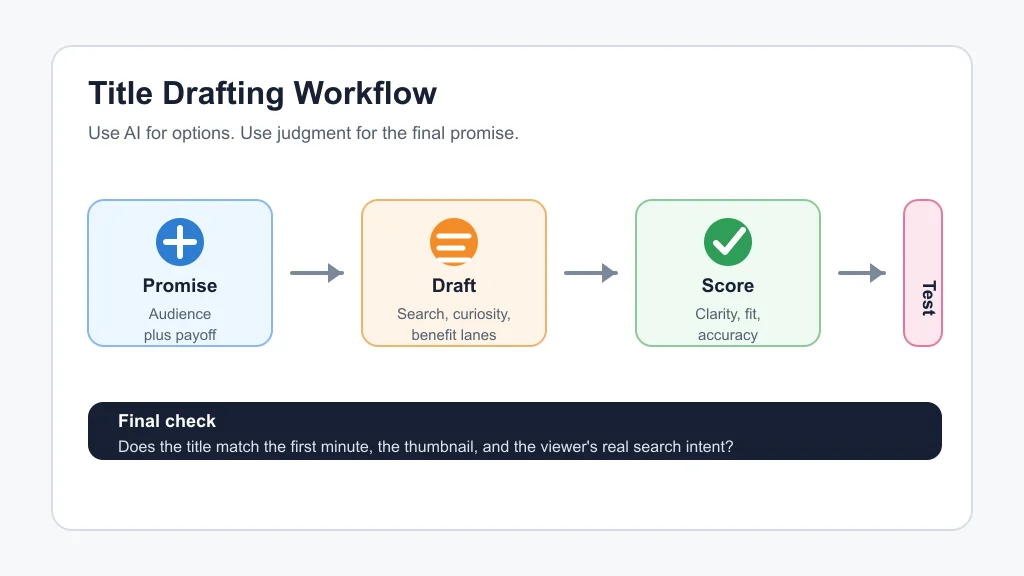
Use the tool after the edit is clear, not before the idea is formed. Paste a short summary, the main viewer problem, the thumbnail concept, and three words you do not want the title to use.
- Write the video's honest promise in one sentence.
- Ask for title options in three lanes: search-first, curiosity-first, and benefit-first.
- Cut any option that the opening minute does not support.
- Pair each finalist with the thumbnail and check whether they repeat or reinforce each other.
- Save the best rejected title, because it may become a Short, community post, or follow-up video.
That rhythm keeps AI in the drafting lane. It also stops you from choosing a title just because it looks punchy in a list.
Tools worth shortlisting
Hootsuite, vidIQ, VEED, TubeBuddy, and Canva-style writing assistants can all produce usable title drafts, but they are not interchangeable. Free generators are fine for quick ideation. Creator-focused platforms are stronger when they connect titles to keyword research, competing videos, or channel analytics.
For a new creator, a simple free generator plus manual review is enough. For a channel with steady traffic, a tool that supports research, saved ideas, and YouTube testing habits is more useful than another blank text box.
- Use Hootsuite or VEED when you need fast idea volume for a video topic.
- Use vidIQ or TubeBuddy when search data, title formulas, and channel context matter.
- Use ChatGPT or Claude when you want more control over voice, constraints, and title variants.
- Use YouTube Studio testing when the video already has enough expected traffic to compare options.
Score titles before you publish
Pick a title with a small rubric instead of a gut reaction. I like a four-part check: clarity, curiosity, accuracy, and thumbnail fit.
Clarity asks whether a viewer understands the topic instantly. Curiosity asks whether there is a reason to click now. Accuracy checks whether the video pays off the promise. Thumbnail fit checks whether the title and image work together instead of saying the same thing twice.
Give each finalist a score from one to five. Any title below four on accuracy should be rewritten, no matter how clickable it looks.
Match the title to the video format
Different YouTube formats need different title pressure. A tutorial title should lead with the problem or result. A comparison title should name the decision. A story-driven video can hold back more context, but only if the thumbnail carries enough signal.
| Video type | Title angle that usually works | Watch-out |
|---|---|---|
| Tutorial | Problem plus outcome | Do not bury the task behind clever wording |
| Tool review | Tool name plus buying question | Avoid sounding like a sponsored claim |
| Comparison | Choice, audience, or tradeoff | Name who each option is for |
| Podcast clip | Strong claim or guest insight | Keep enough context so it does not feel misleading |
| Faceless explainer | Specific curiosity with clear topic | Do not let mystery erase search relevance |
Use testing, but do not outsource judgment
YouTube's own title and thumbnail testing can compare up to three title or thumbnail combinations for eligible videos. That is useful, especially because the winning option is based on watch time rather than only initial clicks.
Still, testing is not magic. Small channels may not get enough signal, and a winning title on one video may fail on the next because the audience, topic, and thumbnail changed.
Keep a simple title log with the draft, final title, thumbnail concept, click-through rate, retention notes, and comments. After ten uploads, that log teaches you more than another list of viral formulas.
Where title tools fit into the rest of your creator stack
Titles sit beside thumbnails, scripts, clips, captions, and repurposing. If your thumbnail is weak, read our guide to AI thumbnail A/B testing tools and compare it with AI thumbnail tools before blaming the title.
For YouTube planning, connect title generation with faceless YouTube video tools, AI B-roll generators, and Runway vs Pika research when the video concept still needs visual support.
Short-form creators should pair title ideas with an AI clip generator for TikTok creators, an AI Reel generator from podcast, or an AI podcast clip generator so the hook survives the cutdown.
Writing-heavy creators can build a wider planning loop with AI social media caption tools, an AI caption generator for Instagram Reels, AI content calendar generators, and newsletter repurposing workflows.
If you publish lessons, products, or long-form assets, connect the title process to AI course outline generators, AI tools for newsletter creators, and a broader content repurposing workflow.
Audio and voice workflows need the same promise discipline. Review AI dubbing tools for YouTube, AI voice cloning disclosure, and ElevenLabs alternatives if your title points to translated, dubbed, or synthetic narration.
For visual ideation outside thumbnails, compare a broader AI image generator for creators. For clipping workflow tradeoffs, check Opus Clip alternatives.
Quick Checklist
- Write the video's honest viewer promise before opening a generator.
- Generate search-first, curiosity-first, and benefit-first title lanes.
- Move the clearest words toward the front of the title.
- Check that the thumbnail and title reinforce each other without repeating.
- Reject any title the video does not actually deliver.
- Test up to three options when the video has enough expected traffic.
- Track title performance so future prompts get sharper.
AI can speed up title writing, but it should not flatten your channel voice. Use it to explore angles, pressure-test phrasing, and avoid blank-page panic. Then choose the title that makes the right viewer think, yes, this is exactly what I came for.
Frequently Asked Questions
what is the best ai youtube title generator?
The best option depends on your workflow. vidIQ and TubeBuddy are stronger for YouTube-specific research, while free generators from Hootsuite or VEED are useful for quick drafts. Chat-based tools are best when you want custom voice and constraints.
are ai youtube title generators accurate?
They can be accurate if you give them the video topic, viewer promise, audience, and thumbnail idea. They become risky when they invent drama, claims, or outcomes that the video does not support.
how long should a youtube title be?
YouTube allows long titles, but creators usually get better results when the clearest words appear early. Aim for a concise promise that still reads well on mobile and in suggested videos.
can ai write youtube titles that get more views?
AI can help you draft more angles and avoid weak phrasing, but views depend on the video, thumbnail, audience, topic, timing, and retention. A better title helps most when it matches a video people want to finish.
should I use youtube title testing?
Use it when the video is eligible and likely to get enough traffic for a useful comparison. Testing can help pick between strong finalists, but it should not replace basic accuracy and audience judgment.
Official sources: YouTube Help thumbnail and title tips · YouTube Help A/B test titles and thumbnails.