Image Tools
Best AI Thumbnail Tools for YouTube Creators in 2026
Compare the best ai thumbnail tools for youtube 2026 by workflow, testing, speed, and control so your next upload looks clickable, not fake.
If you searched for best ai thumbnail tools for youtube 2026, you are probably not looking for another random list of image generators. You need a tool that can move a thumbnail from rough click idea to clean export without making your channel look generic.
My practical answer: use one tool for speed, one for original image ideas, and one testing habit that keeps you honest. A good thumbnail stack should help you ship faster, but it should also protect the promise your title makes.
| What you see | Likely cause | First move |
|---|---|---|
| Low impressions click-through | The idea is unclear at feed size | Redo the concept before polishing colors |
| People click but leave fast | The thumbnail overpromises the video | Match the visual hook to the first 30 seconds |
| Text looks strange | The image model rendered letters | Add final text in a design tool |
| Every thumbnail looks the same | You are copying templates too closely | Create a reusable layout, then vary the visual contrast |
| Testing gives no clear winner | The variants are too similar | Test different ideas, not tiny color changes |
How to Pick the best ai thumbnail tools for youtube 2026
Start with the job, not the brand name. A faceless tutorial channel, a podcast clips channel, and a personality-led commentary channel all need different thumbnail work.
Creators who already have strong footage often need editing speed, layout control, and readable text. Creators with abstract topics need stronger concept generation first. That is where AI image tools can help, especially if you treat the first output as a draft instead of a finished thumbnail.
The Shortlist: Which Tools Fit Which Creator?
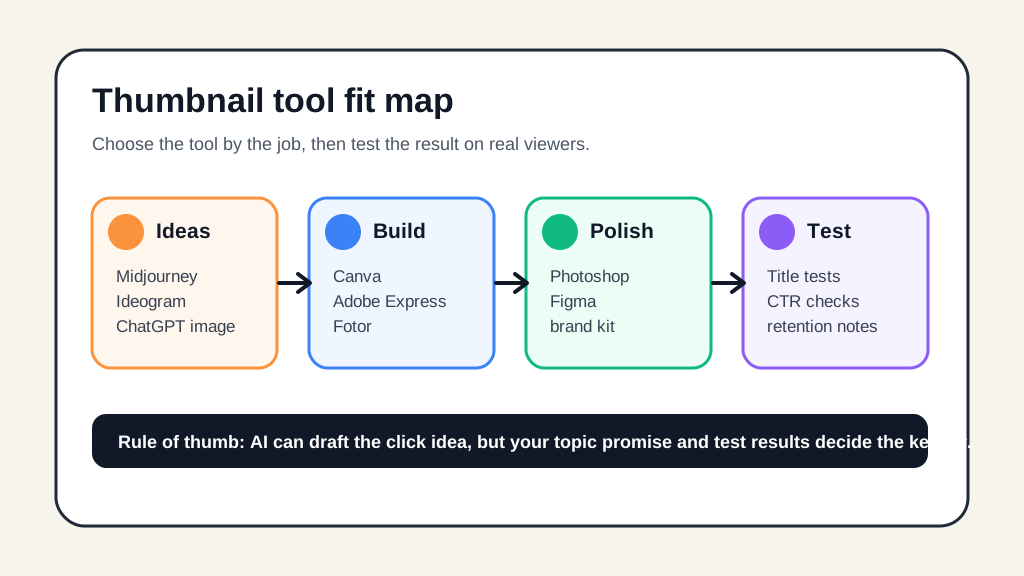
Canva is the best default for creators who want speed. It gives you templates, brand assets, AI image generation, background removal, and simple exports in one workflow, which matters when you publish often.
Adobe Express is a close alternative if you already live in Adobe tools or want a polished design workflow without opening full Photoshop. It is especially useful for brand-consistent channels that need clean typography and layout control.
Fotor fits creators who want quick AI-assisted image cleanup, background handling, and simple design edits without a heavier creative suite. Use it when speed matters more than deep art direction.
Midjourney and Ideogram are better for original visual concepts. They can produce strong mood, character, scene, and style ideas, but you should expect to finish the thumbnail elsewhere.
ChatGPT image generation is useful when you need to iterate from a clear written brief. I would use it for concept options, rough compositions, and visual variations, then rebuild the final version in a tool where you control text and spacing.
Photoshop and Figma are not thumbnail-specific AI tools, but they still matter. Photoshop is the better finishing tool for composites and retouching. Figma is excellent for reusable thumbnail systems, especially if your channel uses recurring series formats.
Best Tool by Workflow, Not Hype
Pick Canva if your main problem is shipping thumbnails faster without losing brand consistency. It is the practical choice for solo creators, newsletter-to-video creators, and channels that need a steady publishing rhythm.
Pick Adobe Express if your thumbnails need cleaner design polish and you already use Adobe assets. It is a better fit for creators who care about typography, layout discipline, and consistent templates.
Pick Midjourney or Ideogram when the concept itself is the bottleneck. If your topic is "AI agents explained" or "the hidden cost of cheap gear," a unique image idea can beat another stock-style headshot.
Pick Photoshop if the thumbnail depends on combining faces, objects, screenshots, lighting, and masks. AI can accelerate parts of that work, but a thumbnail with five visual layers still needs precise finishing.
Where AI Thumbnails Still Go Wrong
AI tools are strongest at ideation and weakest at judgment. They can make a dramatic image in seconds, but they do not know whether your audience has seen the same composition twenty times this week.
Watch for fake interface details, strange hands, unreadable text, too much facial intensity, and designs that only look good at full size. Honestly, most thumbnail advice skips the tiny-feed test, and that is where many pretty designs fail.
Before you export, zoom out until the thumbnail is about the size it will appear on a phone. If the story disappears, the design is not done.
Testing Matters More Than the Tool List
As of June 9, 2026, YouTube's public help docs still point creators toward basic custom thumbnail requirements, including a 16:9 image, 1280 by 720 pixels as the recommended resolution, and standard image formats. Build to those rules first so your AI workflow does not create a beautiful file that needs rework at upload.
YouTube also documents Test & Compare for eligible videos, where creators can compare thumbnail options and learn from watch-time-based results. That changes the way I would use AI: make three genuinely different concepts, not three nearly identical color swaps.
For a wider production stack, connect thumbnails to the rest of the video system. A stronger AI tools for YouTube creators workflow should tie the title, script, edit, short-form cutdowns, and thumbnail promise together.
How This Fits Your Creator Stack
Thumbnails rarely work alone. If your visual hook depends on a stronger video idea, pair the design process with an AI script generator for YouTube videos so the package and the actual content line up.
Repurposing channels should also compare the thumbnail against the short-form angle. An AI Shorts generator from long video can surface the clip idea, but the main video thumbnail still needs its own promise.
If the channel is built around tutorials, reviews, or commentary, your edit workflow matters too. The right AI video editing tools for YouTube creators help you spot moments that deserve a thumbnail concept instead of guessing from the title alone.
Audio-led channels should keep visual packaging honest. If you use synthetic narration, compare options from AI voice tools for YouTube creators and ElevenLabs alternatives for YouTube before building thumbnails around a voice style the audience may not trust.
Creators publishing across platforms can reuse the same idea, but not always the same design. A YouTube thumbnail has different jobs than an Instagram caption, so pair it with an AI caption generator for Instagram Reels only after the core video promise is clear.
If budget is tight, compare paid options against the best free AI tools for content creators. Free plans can work for early channels, but watermark rules, export limits, and commercial-use terms matter.
For image-heavy workflows, read the broader best AI image generator for creators guide and the practical AI thumbnail generator for YouTube workflow. If you edit in video-first tools, the CapCut vs Descript and Descript alternatives for creators comparisons can help you choose where thumbnail work should sit in your process.
Newsletter creators have a slightly different problem: the thumbnail often starts as a research angle. In that case, connect the image idea to AI tools for newsletter creators so the YouTube packaging supports the same audience promise.
Quick Checklist
- Write the video promise before opening an AI image tool.
- Create three visibly different thumbnail concepts, not tiny variations.
- Add final text in a layout tool, not inside the raw image model output.
- Check the design at mobile feed size before exporting.
- Use a 16:9 layout and YouTube's current upload requirements.
- Compare early click behavior with retention so the thumbnail does not overpromise.
- Save rejected concepts for future title angles.
Frequently Asked Questions
what is the best ai thumbnail tool for youtube
For most YouTube creators, Canva or Adobe Express is the easiest first pick because the workflow includes templates, brand assets, export settings, and fast iteration. If you want more original concepts, use Midjourney, Ideogram, or ChatGPT image generation first, then finish the design in a layout tool.
can ai make youtube thumbnails that get more clicks
AI can help you explore stronger concepts faster, but it cannot guarantee higher click-through rate. The winning thumbnail still depends on the video idea, title match, audience expectations, and whether the image stays readable at feed size.
is canva good for youtube thumbnails
Canva is a strong thumbnail tool for creators who need speed, templates, brand kits, and simple AI image generation in one place. It is less ideal if you need heavy compositing, advanced masking, or very specific art direction.
what size should ai youtube thumbnails be
Build thumbnails at 1280 by 720 pixels in a 16:9 layout, then keep the file within YouTube upload limits. Design with mobile in mind because most viewers will see a much smaller version in the feed.
should i use ai text in youtube thumbnails
Use AI-generated text only if you can inspect and correct it before upload. Many image models still distort letters, so creators usually get cleaner results by adding final text in Canva, Adobe Express, Photoshop, or Figma.
Final Take
The best thumbnail setup for 2026 is not one magic AI app. It is a small workflow: generate several clear ideas, build the final layout in a controlled design tool, and test the versions that make meaningfully different promises.
Start with Canva or Adobe Express if you need speed. Add Midjourney, Ideogram, or ChatGPT image generation when the concept is the hard part. Then let YouTube performance tell you what your audience actually believed.
Official sources: Add custom thumbnails on YouTube · Test and compare thumbnails. Check current program pages before applying.