Tool Reviews
Opus Clip Alternatives for Creators: How to Pick the Right AI Clipping Workflow
Compare opus clip alternatives for creators by auto-clipping quality, caption control, exports, review workflow, and publishing fit.

Opus clip alternatives for creators are worth comparing when your short-form workflow needs more control, better captions, different pricing, or a stronger review process. The right tool depends less on a feature table and more on how your actual videos become publishable clips.
Creators searching for opus clip alternatives for creators usually want faster repurposing from podcasts, interviews, webinars, tutorials, livestreams, or YouTube videos. Speed matters, but context matters too.
Use this guide as a testing framework before switching tools. It helps you compare clipping quality, caption editing, exports, brand control, and creator review without turning every article into a generic tool list.
| What you see | Likely cause | First move |
|---|---|---|
| Auto clips feel random | Tool optimizes for loud moments, not audience value | Test hook quality on real episodes |
| Captions need heavy cleanup | Transcript and line breaks are weak | Compare caption editor speed |
| Exports look off-brand | Templates are too rigid | Check brand kit and layout controls |
| Team review is slow | Approval happens outside the tool | Choose a workflow with comments or clear handoff |
Test the tool on your real source videos
Do not judge clipping tools from demo videos alone. Upload a typical long-form episode, a weaker episode, a solo tutorial, and a guest conversation. A strong alternative should find usable moments across your real content, not only in polished examples.
Opus clip alternatives for creators should be compared by how many clips survive review. Ten auto-generated clips are not useful if only one is accurate and interesting.
If your source is audio-heavy, compare the process with an AI podcast clip generator. Podcast clips often need stricter transcript and context review.
Compare caption control and transcript cleanup
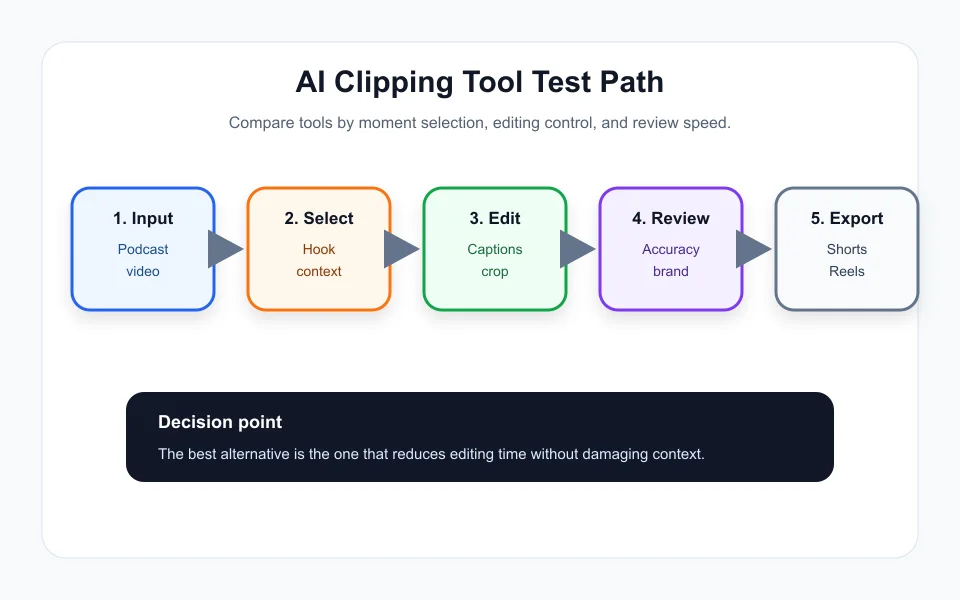
Captions can make or break a short. Look for easy transcript editing, smart line breaks, safe title areas, speaker correction, and the ability to quickly fix names, tools, numbers, and technical phrases.
Many opus clip alternatives for creators look similar until you edit 20 captions in a row. The best tool is often the one that makes cleanup boring and fast.
Creators who add AI-generated voice, translated audio, or synthetic elements should also understand AI voice cloning disclosure on YouTube before publishing altered material.
Look at workflow fit, not only AI scoring
A clipping score is only one signal. Your workflow may need brand templates, file naming, team comments, direct exports, batch rendering, content calendar handoff, or clean downloads for a separate editor.
Connect the output to an AI content calendar generator if one long video becomes several platform-specific posts. The clip tool should feed the calendar, not create another scattered folder.
If your videos need extra visual support, pair clipping with AI b-roll generators for YouTube. The clip might need context visuals before it feels finished.
Check pricing against actual publishing volume
A cheap plan may become expensive if it limits upload minutes, exports, watermark removal, storage, team seats, or advanced captions. A higher plan may be worth it if it replaces editor hours every week.
When comparing opus clip alternatives for creators, calculate cost per approved clip, not cost per generated clip. Generated clips that never publish have no value.
If the tool also supports newsletter snippets or post ideas, connect it to your AI newsletter repurposing workflow so each strong clip becomes more than one asset.
Keep creator review as the final gate
AI clipping tools can misunderstand sarcasm, cut before the setup, or turn a nuanced answer into a harsh statement. That is why final review is not optional.
Before switching, build a checklist: accurate caption, no misleading cut, no confidential detail, good crop, platform-safe length, clear hook, and link to the full context if needed.
Opus clip alternatives for creators should save time while preserving the relationship with the audience. If the tool creates fast clips that feel careless, it is not a better workflow.
Quick Checklist
- Test opus clip alternatives for creators on real videos, not demos only.
- Count approved clips, not generated clips.
- Check transcript editing and caption cleanup speed.
- Compare brand templates, exports, naming, and team review.
- Calculate cost per published clip.
- Review context before posting strong or controversial clips.
- Connect approved clips to a calendar or repurposing workflow.
Bottom Line
Opus clip alternatives for creators should be judged by approved output, caption control, workflow fit, and context safety. Pick the tool that makes your real content faster to publish without making it feel machine-cut.
Frequently Asked Questions
What are Opus Clip alternatives for creators?
They are AI clipping tools that turn long videos or podcasts into short-form clips with captions, crops, hooks, and exports.
How should I compare AI clipping tools?
Use real source videos and compare approved clips, caption cleanup time, export quality, brand control, pricing, and review workflow.
Is the cheapest Opus Clip alternative best?
Not always. Calculate cost per approved published clip, not only monthly price.
Do AI clipping tools replace editors?
They can reduce rough-cut time, but creators or editors should still review context, captions, crop, and platform fit.
Can one long video become several posts?
Yes. A good workflow can turn one episode into clips, captions, newsletter snippets, and social posts with review between steps.
Official sources: Opus Clip official site · YouTube Help: Create Shorts. Check current program pages before applying.