Audio Tools
AI Voice Cloning Disclosure on YouTube: What Creators Should Check
Understand ai voice cloning disclosure youtube rules, realistic voice risks, permission checks, and upload review steps before posting.
The phrase ai voice cloning disclosure youtube usually comes from a practical worry: can you upload a video with a cloned or synthetic voice without creating a policy problem? The short answer is that context matters, especially when the voice sounds like a real person.
YouTube does not treat every AI production helper the same way. A synthetic background voice, a cloned voice of a real person, and a fake statement from a public figure create very different trust risks.
| What you see | Likely cause | First move |
|---|---|---|
| The voice sounds like a real person | Viewers may think the person actually spoke | Check disclosure and permission before upload |
| The voice is generic narration | Lower likeness risk, but still synthetic | Review the upload disclosure prompt |
| The script covers news, money, health, or politics | Misleading audio can cause more harm | Use extra labeling and source checks |
| A tool license looks vague | Commercial voice rights may be unclear | Keep provider terms and permission records |
Start with the realistic voice question
Ask whether a normal viewer could believe the voice belongs to a real person. If the answer is yes, treat the upload as sensitive. That does not automatically mean the video is forbidden, but it means your review has to slow down.
A cloned voice of your own voice is usually easier to manage than a cloned voice of someone else. Even then, document consent, keep the original recording source, and avoid using the voice in contexts that would mislead viewers.
A guide to voice tool rights and workflow fit can help compare providers, but provider features do not replace platform disclosure rules.
Separate narration from impersonation
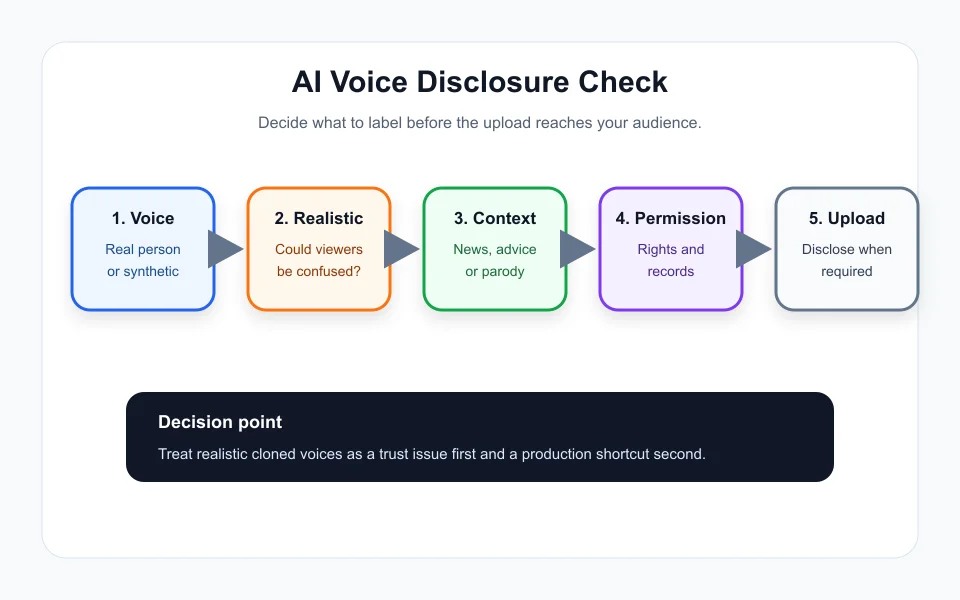
Synthetic narration can be useful for drafts, accessibility, translations, and faceless videos. Impersonation is different. If the voice imitates a known person, copies a client, or suggests someone endorsed a product, you are in higher-risk territory.
Creators often blur this line by accident. A voice model might sound close enough to a celebrity, a boss, a customer, or a family member that viewers infer a real endorsement. That is the moment to stop and choose a safer voice.
If you are building a larger production stack, pair the voice check with AI voice tools for YouTube creators and a written permission log.
Use a repeatable disclosure review before upload
Create a small checklist before every upload that uses cloned or synthetic audio. Ask who the voice represents, whether the viewer could be misled, whether the content includes sensitive topics, and whether permission is recorded.
For videos about finance, health, elections, public safety, or breaking news, be more conservative. Viewers deserve to know when media has been meaningfully altered, especially if the voice changes how they judge a person or event.
This is where a broader AI content calendar workflow helps. Add a disclosure column next to title, thumbnail, sponsor, and rights checks.
Write labels that viewers can understand
If you choose to disclose in the video, say it plainly. Do not bury the note in tiny text or vague phrasing. "This narration uses an AI-generated voice based on the creator voice" is clearer than "enhanced audio workflow."
For parody or commentary, context still matters. A joke can be obvious to your audience and confusing to everyone else once it is clipped, embedded, or republished as a short.
That matters even more when long videos become clips. A repurposed YouTube Shorts workflow should carry disclosure notes into the short version too.
Keep the human voice in the final edit
AI voice tools can clean production, but they can also flatten a channel. If every sentence sounds perfectly smooth, the audience may start trusting the video less, not more.
Review pacing, emphasis, and emotional tone. A cloned voice should not be used to make someone sound angry, excited, scared, or approving if that was not the intent. That is where trust gets damaged.
The best disclosure workflow is not just about avoiding a strike. It protects the relationship with viewers who expect the creator to be straight with them.
Quick Checklist
- Identify whether the voice represents a real person.
- Check whether the audio could confuse a reasonable viewer.
- Review YouTube Studio disclosure prompts during upload.
- Keep written permission and provider-license records.
- Use plain disclosure language for realistic cloned voices.
- Carry disclosure notes into clips, shorts, and repurposed edits.
- Avoid cloned voices for fake endorsements or sensitive claims.
Bottom Line
AI voice cloning disclosure on YouTube is not just a checkbox. It is a trust filter. If a realistic voice could change what viewers believe about a person, event, or endorsement, slow down, disclose carefully, and keep your records.
Frequently Asked Questions
do you have to disclose ai voice cloning on youtube
You may need to disclose it when the audio is realistic and could make viewers think a real person said something they did not say. YouTube guidance should be checked during upload.
does ai narration need a youtube disclosure
Generic synthetic narration is not always the same as cloning a real person, but creators should review the current YouTube disclosure prompt and the context of the video.
can i use a cloned celebrity voice on youtube
That is risky. A celebrity or public figure voice can create likeness, impersonation, permission, and deception issues. Get permission or choose a clearly synthetic original voice.
where is the ai disclosure setting on youtube
YouTube provides an AI use disclosure setting during the upload flow in YouTube Studio. Availability and wording can change, so check the current upload screen.
does youtube label ai generated voice videos
YouTube may display labels for some altered or synthetic content. The creator still has the responsibility to answer disclosure questions accurately.
Official sources: YouTube Help: Disclosing altered or synthetic content · YouTube Help Center. Check current program pages before applying.