Creator Workflows
Build an AI Newsletter Repurposing Workflow That Still Sounds Like You
Build an ai newsletter repurposing workflow that turns one issue into posts, shorts, scripts, and briefs without flattening your voice.

A good ai newsletter repurposing workflow turns one strong issue into a week of platform-ready assets without sanding off the creator's point of view. The trick is not asking AI to "make posts." It is giving the system a brief, a channel map, and a review pass that protects the original argument.
Use this when your newsletter is already the source of truth and you want sharper LinkedIn posts, Reels captions, Shorts scripts, podcast notes, or image prompts from the same idea. You will still edit. AI should remove blank-page drag, not become the author.
| What you see | Likely cause | First move |
|---|---|---|
| Every post sounds generic | The prompt skipped your voice rules | Feed in one short style sample and banned phrases |
| Posts repeat the newsletter | The workflow is summarizing, not adapting | Assign a different job to each channel |
| Short-form scripts feel flat | The hook is buried too late | Extract the conflict before writing the script |
| Too many assets to review | The batch is larger than your quality bar | Cap each issue at the channels you can actually publish |
| AI claims drift from the source | The model is filling gaps | Lock facts to the issue and source notes only |
What You Need Before You Start
Block 20 minutes for setup the first time, then 35 to 60 minutes per newsletter issue after that. Gather the finished issue, the source notes behind it, one or two examples of your best social posts, and a simple channel list.
- Newsletter issue: the final version, not a rough draft.
- Source notes: links, stats, interview notes, product docs, or screenshots that support the claims.
- Voice sample: a paragraph or post that sounds like you on a good day.
- Channel map: LinkedIn, X, Instagram Reels, YouTube Shorts, podcast notes, carousel, or community post.
- Review checklist: voice, fact, disclosure, CTA, and duplicate-content checks.
Build the AI Newsletter Repurposing Workflow
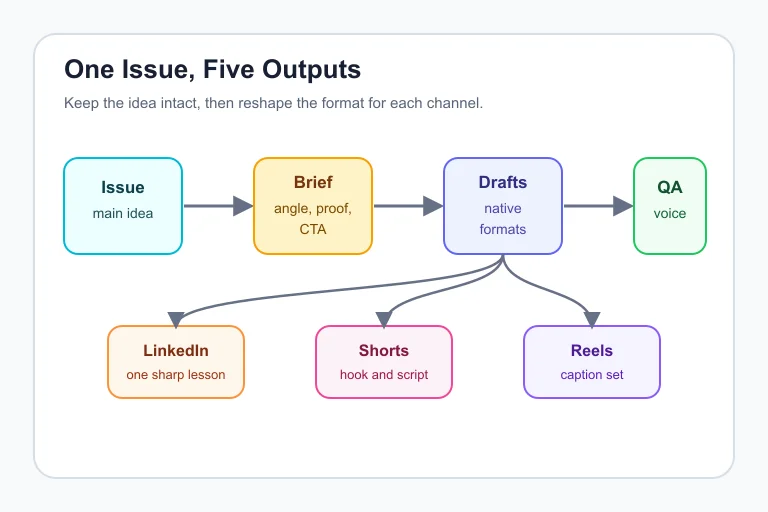
Step 1: Mark the issue's reusable parts, 8 minutes
Start by highlighting the durable pieces inside the issue: the main argument, the surprising detail, the strongest example, the reader objection, and the next action. You are making a parts bin.
Ask your AI tool to return those parts in a small table, then compare it with your own read. If the model misses the real point, fix the brief before you generate anything else.
Step 2: Write one channel job for each output, 7 minutes
Give every channel a different reason to exist. LinkedIn can carry the lesson, Reels can dramatize the before-and-after, YouTube Shorts can use a tight narration hook, and the community post can ask a useful question.
Here is the move most creators skip: write the job before the copy. A channel job sounds like, "Turn the newsletter's third section into a 45-second script for creators who keep over-editing their AI drafts."
Step 3: Create the prompt pack, 10 minutes
Build one reusable prompt with five blocks: source material, voice rules, channel job, output format, and quality checks. Keep it boring. Boring prompts are easier to debug.
For example, tell the model to preserve the original claim, avoid new statistics, write in short paragraphs, and flag anything that needs source confirmation. Then ask for three variations only, not twenty.
Turn One Issue Into Channel-Specific Assets
Step 4: Draft the first batch, 12 minutes
Run the prompt once per channel rather than asking for every output in one giant request. You will get cleaner structure, and you can tune each pass without damaging the rest of the batch.
A practical first batch is enough: one LinkedIn post, three short captions, one 45-second video script, one email preview blurb, and one image prompt. Anything more usually becomes review debt.
Step 5: Convert the newsletter into video and audio prompts, 10 minutes
Creators who already publish video can connect this workflow to adjacent tools. A newsletter section can become a script outline for an AI script generator for YouTube videos, then a narration draft for AI voice tools for YouTube creators.
If you use synthetic narration, voice cloning, realistic avatars, or AI-altered scenes, keep platform disclosure rules in the review step. The output may be short, but the policy risk is not.
Step 6: Pull short-form clips from the same angle, 15 minutes
Convert one newsletter insight into a short-form storyboard: hook, tension, proof, turn, and CTA. If you already have a long video or podcast, an AI Shorts generator from long video can help find the clip, but you still need to check that the clip carries the original context.
Use supporting visuals only when they clarify the idea. For YouTube edits, that could mean using AI B-roll generators for YouTube or comparing broader AI video editing tools for YouTube creators before you standardize the process.
Keep Voice, Proof, and Compliance Intact
Step 7: Run the voice pass, 8 minutes
Read every draft beside the original issue. If the post could belong to any creator in your niche, it is not ready.
Look for the tiny tells: polished but empty phrases, claims that sound bigger than the source, and captions that flatten your point into advice everyone has heard before. I would rather publish fewer pieces than train an audience to ignore me.
Step 8: Run the proof pass, 8 minutes
Check each claim against the issue, your notes, and any official source used for platform rules. Google Search Central warns against scaled content created mainly to manipulate rankings, so keep the goal reader value, not output volume.
For video repurposing, YouTube's Help guidance says creators need to disclose altered or synthetic content when it seems realistic or meaningful. Add a disclosure check to the board before the video asset leaves draft.
Step 9: Add the final CTA, 5 minutes
Give every asset one job after consumption. Send readers back to the issue, invite a reply, point them to a resource, or nudge them toward a related creator tool comparison.
Do not recycle the same CTA everywhere. A newsletter reader, a Shorts viewer, and a LinkedIn follower are in different modes, so meet them where they are.
Connect the Workflow to the Rest of Your Creator Stack
Repurposing works best when it plugs into the tools you already trust. If your newsletter is the hub, start with AI tools for newsletter creators, then branch into channel-specific production.
For visual assets, compare the rights and style controls in the best AI image generator for creators, then use an AI thumbnail generator for YouTube or the best AI thumbnail tools for YouTube creators when the newsletter becomes a video package.
For social distribution, pair the issue with an AI caption generator for Instagram Reels. For editing choices, compare CapCut vs Descript for creators, review Descript alternatives for creators, and keep ElevenLabs alternatives for YouTube on hand if rights, tone, or pricing become a bottleneck.
If you are still building the whole stack, start with the best AI tools for YouTube creators and the best free AI tools for content creators. The goal is not more apps. The goal is fewer repeated decisions.
Quick Checklist
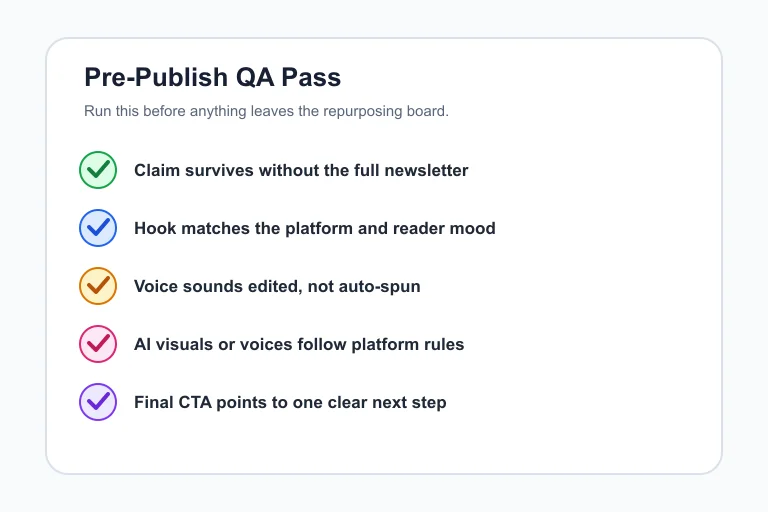
- Highlight the issue's claim, proof, example, objection, and CTA before prompting.
- Write one channel job for each output.
- Limit the first batch to assets you can review in one sitting.
- Reject drafts that add unsupported facts or flatten your voice.
- Check platform disclosure rules for realistic AI audio, visuals, or altered scenes.
- Use one CTA per asset, matched to the platform.
- Save the best prompts as templates, but revise them after every issue.
Frequently Asked Questions
what is an ai newsletter repurposing workflow?
It is a repeatable process for turning one newsletter issue into channel-specific assets with AI support. A strong workflow keeps the original claim, adapts the format for each platform, and includes a human review pass before publishing.
how do i repurpose a newsletter with ai?
Start by extracting the main idea, proof points, examples, and CTA. Then ask AI to draft one output at a time for a specific channel, such as LinkedIn, Reels, YouTube Shorts, or a podcast note, and edit each draft against the original issue.
can ai turn my newsletter into social posts?
Yes, AI can turn a newsletter into social drafts, captions, hooks, scripts, and visual prompts. You still need to verify claims, adjust the voice, and remove anything that feels copied, inflated, or generic.
what tools do creators use to repurpose newsletters?
Creators often combine an AI writing tool, a content calendar, a video editor, a caption tool, and an image or thumbnail generator. The exact stack matters less than having a clear source brief and a review checklist.
how many posts should one newsletter become?
Most solo creators should start with five to seven assets from one issue. That is enough to extend the idea without creating a review pile that lowers quality.
Official sources: YouTube Help: altered or synthetic content disclosure · Google Search Central: spam policies.
A good repurposing system should make the newsletter travel farther, not make your channels feel automated. Keep the brief tight, keep the human edit visible, and let each platform earn its version of the idea.