Creator Workflows
A Solo Creator Workflow for Repurposing Content With AI
Build an ai content repurposing workflow for solo creators that turns one source asset into clips, captions, emails, and posts.
If you searched for an ai content repurposing workflow for solo creators, you probably have one honest problem: the content is already made, but turning it into Shorts, carousels, emails, captions, and follow-up posts still eats the week. AI can help, but only if you give it a tight lane and keep the editorial decisions with you.
A good workflow starts with one strong source asset and ends with a small set of channel-ready pieces. Think less "make everything everywhere" and more "extract the best ideas without sanding off your voice."
| What you see | Likely cause | First move |
|---|---|---|
| Every post sounds the same | The prompt is asking for formats, not angles | Pull three distinct audience problems first |
| Short clips lose context | The AI selected energy over meaning | Add setup before the hook or reject the clip |
| Your newsletter feels copied from the video | No rewrite pass for email rhythm | Turn the source into a note, not a transcript |
| Batch output sits unpublished | Too many assets were generated at once | Limit each source to five publishable pieces |
| AI captions feel generic | The tool does not know your recurring phrases | Feed it a short voice guide and examples |
What You Need Before You Start
Estimated time: 20 minutes. Gather one source asset, a transcript or clean notes, your target channels, and a simple folder structure. Use the clearest source you have: a finished YouTube video, podcast episode, webinar, newsletter, course lesson, or long-form post.
- Create one folder for the source file, one for drafts, and one for approved assets.
- Save the transcript, show notes, screenshots, and any product links beside the source.
- Write a five-line voice guide: common phrases, banned phrases, audience level, tone, and what you never promise.
- Choose no more than three output channels for this run.
Build the ai content repurposing workflow for solo creators
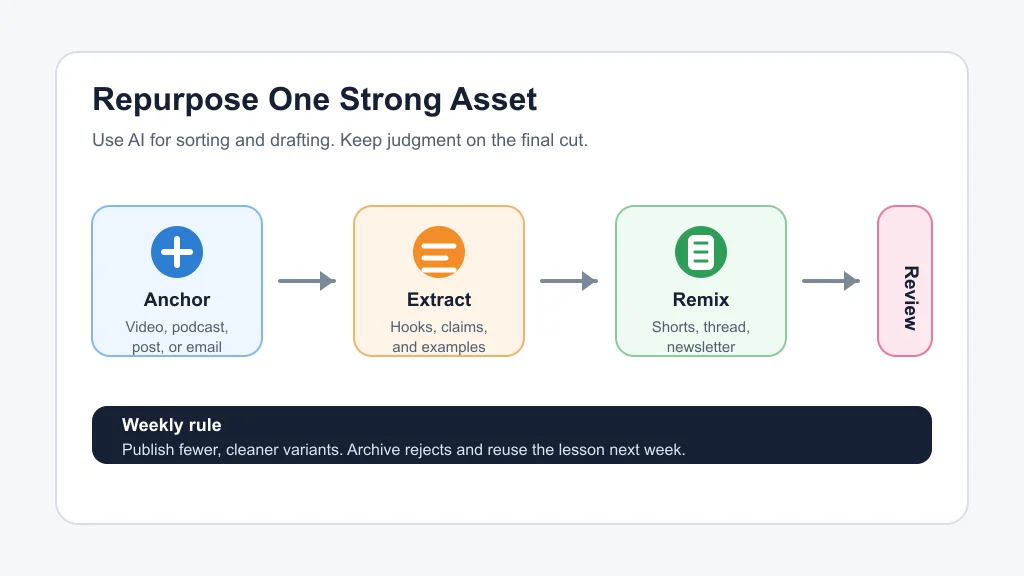
Estimated time: 30 minutes. Treat the first pass like an edit meeting with yourself. Ask AI to summarize the source, list the strongest moments, flag claims that need checking, and suggest which ideas deserve a separate asset.
- Paste the transcript or notes into your AI writing tool and ask for themes, not finished posts.
- Sort the results into three buckets: teach, prove, and tease.
- Reject anything that only repeats the intro, sounds like filler, or needs too much context.
- Pick one anchor angle for each channel instead of pushing the same line everywhere.
For example, a YouTube tutorial might become one short clip, one email lesson, one LinkedIn post, and one Instagram caption. That is enough. A solo workflow gets weaker when it tries to imitate a full media team.
Turn One Source Into Channel-Specific Assets
Estimated time: 45 to 75 minutes. Ask AI for drafts only after the angle is clear. A short-form video needs a hook and payoff. A newsletter needs a smoother arc. A social caption needs one sharp idea with a reason to respond.
- For video clips, mark the setup, hook, useful middle, and clean endpoint before exporting.
- For captions, ask for three versions: direct, contrarian, and practical.
- For email, rewrite the idea as a short lesson rather than copying the transcript.
- For carousels or image posts, turn the idea into a checklist or mistake list with minimal text.
If your anchor asset is a podcast, pair this with an AI Reel generator from podcast workflow or a dedicated AI podcast clip generator. For a long YouTube video, compare an AI clip generator for TikTok creators, an AI B-roll generator, and faceless YouTube video tools before you lock the format.
Add a Human Review Pass Before Scheduling
Estimated time: 25 minutes. Review every asset for meaning, platform fit, rights, and voice. AI can make a rough draft feel finished too early, which is where solo creators usually lose trust with the audience.
- Read the asset without the source open and ask whether a new viewer would understand it.
- Check names, prices, tool claims, screenshots, music rights, guest permissions, and AI disclosure needs.
- Cut repeated phrases across platforms so the batch does not look copied.
- Preview video captions and graphics at phone size before scheduling.
Voice and likeness checks matter more when you use dubbing, synthetic narration, or translated clips. Review AI dubbing tools for YouTube, ElevenLabs alternatives, and AI voice cloning disclosure guidance before that becomes part of your repeatable system.
Schedule the Batch Without Flooding Your Feed
Estimated time: 15 minutes. Publish the best assets in a sequence that makes sense for the reader, not the software. A useful order is teaser, useful lesson, proof point, deeper link, then recap.
- Place the strongest clip or post first so the topic gets a clean signal.
- Space repeated angles by at least a day unless the platform rewards tighter bursts.
- Use a calendar note to record which source asset each post came from.
- After publishing, save comments and questions as inputs for the next source asset.
A lightweight AI content calendar generator can help here. If newsletter is your main channel, connect the process to an AI newsletter repurposing workflow or broader AI tools for newsletter creators.
Choose Tools by Bottleneck, Not Hype
Estimated time: 20 minutes. Your tool stack should match the part that slows you down. Some solo creators need clipping. Others need caption polish, thumbnails, outlines, or a cleaner writing pass.
- If editing is the bottleneck, compare Opus Clip alternatives, Descript alternatives, and Runway vs Pika.
- If writing is the bottleneck, use AI social media caption tools and an AI caption generator for Instagram Reels as draft partners, not autopilot.
- If planning products or lessons is the bottleneck, feed proven audience questions into AI course outline generators.
- If visuals slow you down, test AI thumbnail tools, AI thumbnail A/B testing tools, and an AI image generator for creators.
Honestly, most tool stacks get bloated because they are built around features instead of friction. Start with one bottleneck, fix it, and only then add another tool.
Quick Checklist
- Start with one strong source asset, not a blank prompt.
- Extract themes, claims, hooks, and audience questions before drafting.
- Limit each source to a small set of assets you can actually review.
- Rewrite for each channel instead of copying the same paragraph everywhere.
- Check context, captions, source claims, rights, and AI disclosure needs.
- Schedule assets in a sequence that teaches or builds curiosity.
- Record what worked so the next batch gets faster.
A solo repurposing system should feel calm, not like a machine throwing drafts at every platform. Let AI do the sorting, clipping, and first-pass writing. Keep the taste, truth, and final publishing call with you.
Frequently Asked Questions
what is the best ai content repurposing workflow for one person?
The best workflow starts with one strong source asset, extracts a few clear audience angles, drafts channel-specific versions, and ends with a human review before scheduling. Keep the batch small enough to edit properly.
how do solo creators repurpose content with ai?
Solo creators usually use AI to summarize transcripts, find clips, draft captions, reshape long ideas into emails, and organize a posting calendar. The strongest results still need manual selection and cleanup.
what content should I repurpose first?
Start with content that already proved useful: a video with strong retention, a podcast segment people quoted, a newsletter with replies, or a post that brought detailed comments. Good source material beats clever automation.
can AI repurpose long videos into shorts?
Yes. AI clipping tools can find candidate moments, create vertical crops, add captions, and export short videos. You should still check context, captions, speaker framing, and whether the clip makes sense by itself.
how many pieces should one article or video become?
For most solo creators, three to five good pieces is a better target than ten weak ones. Use more only when the source has several distinct ideas and you have time to review each asset.
Official sources: Repurpose.io content distribution tool · Disclosing use of GenAI content. Check current program pages before applying.