AI Writing
AI Social Media Caption Tools: How Creators Should Choose Without Sounding Generic
Compare ai social media caption tools by voice control, platform fit, repurposing workflow, disclosure needs, and editing speed for creators.

AI social media caption tools can save a creator hours, but the wrong tool makes every post sound like the same recycled prompt. The goal is not to let software invent a personality. The goal is to turn a real video, idea, newsletter, podcast, or product note into platform-ready options that still sound like the creator.
A strong caption workflow helps with hooks, short captions, long captions, hashtags, calls to action, accessibility notes, and repurposing. The best AI social media caption tools also make it easy to reject weak outputs quickly. Speed matters, but voice control matters more.
| What you see | Likely cause | First move |
|---|---|---|
| Captions sound generic | The tool has no voice memory or examples | Feed it your own posts and banned phrases |
| Hooks feel clickbait-heavy | The prompt optimizes attention only | Ask for accurate curiosity, not hype |
| Posts do not fit each platform | One caption is reused everywhere | Create separate versions for each channel |
| Editing still takes too long | The output has no decision structure | Request three usable angles and one final draft |
Choose for Voice Control First
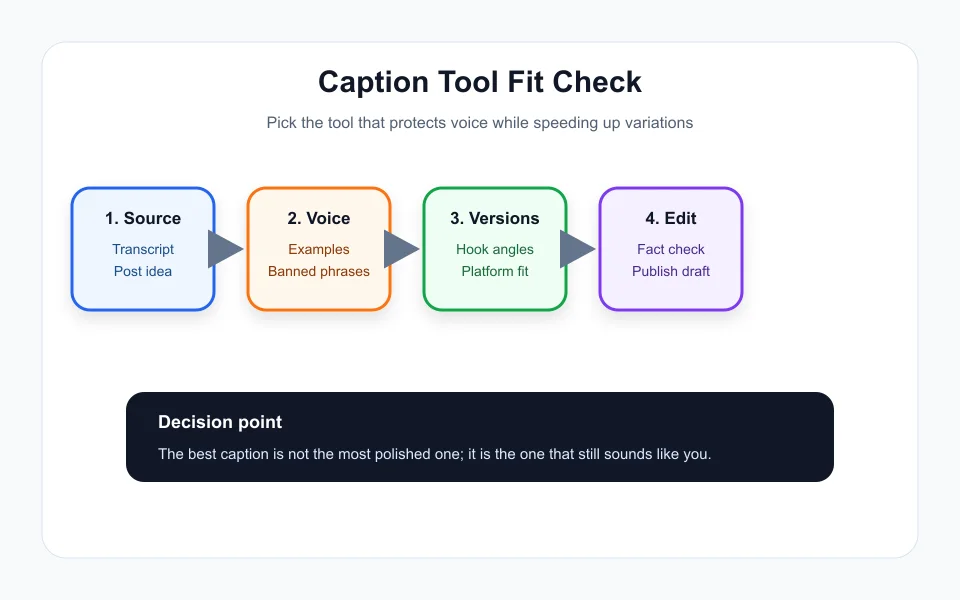
The most important feature in AI social media caption tools is voice control. A caption generator that cannot learn your tone, sentence length, favorite phrases, and off-limit language will keep producing shiny but forgettable posts. Before judging any tool, test it with three of your own strong captions and ask for a new version in the same rhythm.
A good tool should let you save voice notes, examples, audience details, and platform rules. It should also accept negative instructions such as no fake urgency, no overused emojis, no corporate phrases, and no claims the content does not support. Those constraints are what keep AI useful instead of noisy.
Match the Caption Type to the Content Asset
Not every caption has the same job. A Reel caption might need a quick hook and search-friendly phrase. A YouTube description needs clarity, chapters, links, and context. A LinkedIn post may need a stronger point of view. A newsletter teaser needs curiosity without giving away the whole issue. AI social media caption tools should support those differences.
The workflow should start from the source asset. Paste the video transcript, outline, product note, or podcast summary first. Then ask for caption angles: practical tip, mistake to avoid, behind-the-scenes note, contrarian take, and direct benefit. This gives you options without forcing one generic output across every channel.
For nearby creator workflows, compare this caption process with Runway vs Pika for Creators: Which AI Video Workflow Fits Your Content?, Opus Clip Alternatives for Creators: How to Pick the Right AI Clipping Workflow, AI Podcast Clip Generator: Turn Long Episodes Into Shorts Without Losing Context, AI Voice Cloning Disclosure on YouTube: What Creators Should Check, and AI Content Calendar Generator for Creators: Plan Without Sounding Automated.
Use AI for Variations, Not Final Judgment
The best use of AI social media caption tools is variation. Ask for ten hooks, three caption lengths, two calls to action, and one plain-language version. Then choose the version that actually matches the asset. Creators who publish everything the tool gives them usually flatten their voice over time.
A practical review pass is short: remove unsupported claims, simplify the first line, check that the call to action matches the post, and delete anything that sounds like a template. The final caption should feel like a faster version of your own writing, not a separate voice wearing your brand colors.
Do Not Ignore Accessibility and Platform Context
Captions are not only marketing copy. They help viewers understand context, search the topic, and decide whether to watch or save. For video, separate social post captions from on-video subtitles. AI can help draft both, but subtitles need accuracy and timing. Post captions need clarity, search language, and a reason to engage.
Creators should also watch platform norms. A caption that works on Instagram may feel thin on YouTube, too casual on LinkedIn, or too long on TikTok. AI social media caption tools are strongest when they generate platform-specific versions rather than one all-purpose block.
How to Test a Caption Tool Before Paying
Run the same source asset through each tool and compare the time to a publishable caption. Look at first-line quality, voice match, factual accuracy, hashtag usefulness, editing time, and whether the tool helps repurpose the asset into multiple channels. Ignore demos that only show perfect prompt examples.
The winner is the tool that helps you publish more consistently while sounding more like yourself. AI social media caption tools should reduce blank-page time, not replace taste.
Quick Checklist
- Test the tool with your own best captions before judging output.
- Save banned phrases, tone rules, and audience notes.
- Generate different versions for each platform.
- Use AI for hooks and variations, then edit like a human.
- Check factual claims and accessibility needs before posting.
Bottom Line
AI social media caption tools are worth using when they preserve voice, create useful variations, and speed up platform-specific publishing. The best workflow still ends with a human edit.
Frequently Asked Questions
Are AI social media caption tools worth it for small creators?
Yes, when they reduce blank-page time and help repurpose existing content, but they still need examples and human editing to avoid generic captions.
What should creators test before paying for a caption tool?
Test voice match, first-line quality, platform-specific output, factual accuracy, hashtag usefulness, and how long it takes to edit the output.
Can AI write captions for every platform?
It can draft platform-specific versions, but creators should adjust tone, length, calls to action, and context before publishing.
Official sources: Canva AI caption generator · YouTube Help: Add subtitles and captions. Check current program pages before applying.