Tool Reviews
Runway vs Pika for Creators: Which AI Video Workflow Fits Your Content?
Compare runway vs pika for creators by video control, style testing, edit workflow, pricing fit, rights checks, and review time.

Runway vs Pika for creators is not a simple winner-takes-all comparison. Both tools can help with AI video, but the right choice depends on your source assets, style goals, editing workflow, budget, and how much control you need before publishing.
Creators comparing runway vs pika for creators should avoid judging only from viral demos. A useful test asks the same prompt questions across both tools and compares approved clips, not lucky generations.
This guide gives a practical framework for YouTubers, short-form creators, educators, and solo brands testing AI video without wasting credits.
| What you see | Likely cause | First move |
|---|---|---|
| One tool looks better in demos | Prompt and source assets differ | Run the same test set |
| Clips are hard to edit | Control tools do not match your workflow | Check timeline and export handoff |
| Costs are confusing | Credits, quality, and usage differ | Calculate cost per approved clip |
| Output feels off-brand | Style rules are unclear | Create a brand test prompt library |
Test both tools with the same creative brief
Use one prompt set for product b-roll, one for talking-point visuals, one for stylized motion, and one for a realistic scene. Keep aspect ratio, length, and source images consistent.
Runway vs Pika for creators becomes clearer when you compare repeatability. If a tool makes one amazing clip but struggles to repeat the look, it may be harder to use in a weekly workflow.
If your main need is supporting footage for YouTube, compare this with AI b-roll generators before choosing a platform.
Compare control, not only output beauty
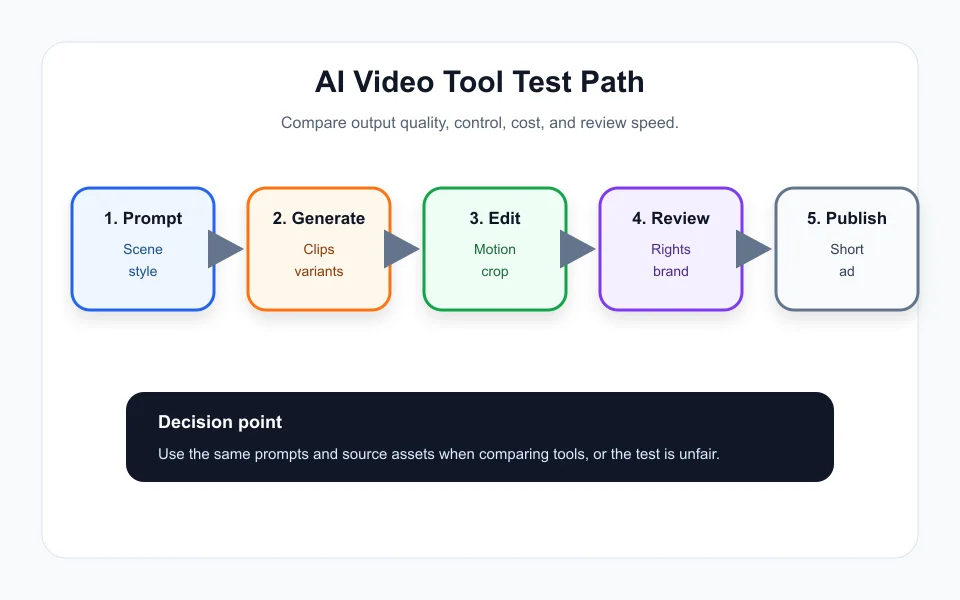
A clip can look beautiful and still be hard to use if motion, framing, timing, or subject consistency is not controllable. Creators need tools that fit editing, not only impressive previews.
In a runway vs pika for creators test, note how quickly you can adjust camera movement, regenerate a scene, crop for platforms, and hand the clip into your editor.
For repurposed content, the same review habit applies to Opus Clip alternatives: usable output beats flashy output.
Check pricing by approved clip
AI video can burn credits quickly. Track how many generations it takes to create one approved clip, not how many total clips appear in the dashboard.
Runway vs Pika for creators should include export quality, watermark handling, commercial-use terms, team features, and storage. Always review current official terms before using generated video in client or sponsor work.
If clips feed a posting calendar, connect the test to an AI content calendar generator so you know whether the output actually supports publishing.
Decide by content type
Creators making cinematic concept visuals may prioritize style and motion control. Educators may prioritize clear, simple b-roll. Product creators may need brand consistency and fewer strange details.
Runway vs Pika for creators may produce a different answer for each content format. A tool that is excellent for surreal short-form visuals may not be best for practical tutorials.
For audio-first creators, use AI podcast clip generator to decide whether AI video is even needed for every post.
Keep a review gate before publishing
Review generated clips for misleading visuals, brand mismatch, unsafe claims, rights concerns, and synthetic-content disclosure needs. This matters more as AI video becomes more realistic.
Store approved prompts and rejected examples. Over time, that library becomes more valuable than one-off experiments.
If a clip becomes newsletter or sponsor material, tie it into an AI newsletter repurposing workflow so the same review standard follows every format.
Quick Checklist
- Compare runway vs pika for creators with the same prompts.
- Track approved clips, not total generations.
- Check motion control, edit handoff, exports, and rights terms.
- Use different tests for b-roll, product scenes, and stylized visuals.
- Calculate cost per approved clip.
- Review generated video before client, sponsor, or public use.
- Save a prompt library for repeatable brand output.
Bottom Line
Runway vs Pika for creators should be decided by repeatable workflow fit. Test the same briefs, compare approved output, and choose the tool that gives you usable video with the least review friction.
Frequently Asked Questions
Is Runway or Pika better for creators?
It depends on your content type, control needs, budget, and how many approved clips you get from the same test prompts.
How should I test Runway vs Pika?
Use the same prompts, source assets, aspect ratios, and quality targets, then compare approved output and edit time.
Should I judge by demo videos?
No. Demo videos can be polished. Test your own real content and prompts.
What cost metric matters most?
Cost per approved usable clip matters more than monthly price or total generated clips.
Do AI video clips need review?
Yes. Review for visual accuracy, brand fit, rights, misleading scenes, and disclosure needs before publishing.
Official sources: Runway official site · Pika official site. Check current program pages before applying.