Audio Tools
Best AI Dubbing Tools for YouTube: Voice Quality, Captions, Rights, and Workflow Fit
Compare the best ai dubbing tools for youtube by voice quality, translation review, captions, rights, turnaround time, and upload workflow.
The best ai dubbing tools for youtube are not just the tools that translate fastest. They are the tools that preserve meaning, protect the creator's voice, keep captions aligned, and make review easy before an audio track goes live. Bad dubbing can make a strong video feel careless in another language.
Creators should compare AI dubbing by workflow, not by demo clips. The best ai dubbing tools for youtube need transcript cleanup, translation review, voice quality controls, export options, caption support, and clear rights for commercial channel use.
| What you see | Likely cause | First move |
|---|---|---|
| Dub sounds robotic | Voice model or pacing is weak | Test a real video, not a demo script |
| Translation misses meaning | No native-language review step | Add human review before publishing |
| Captions do not match | Audio and subtitle workflows are separated | Export captions after final audio timing |
| Upload process is confusing | Tool does not match YouTube workflow | Check multi-language audio requirements first |
Start With the Viewer Experience
The best ai dubbing tools for youtube should make the viewer forget the tool exists. The translated audio needs natural pacing, clean pronunciation, and the same emotional intent as the original. It does not have to clone every breath, but it must avoid strange emphasis and mistranslated jokes.
Creators should test with a difficult clip: fast intro, proper nouns, product names, idioms, and a call to action. If the tool handles only simple narration, it may not be ready for your channel.
Keep Translation Review in the Workflow
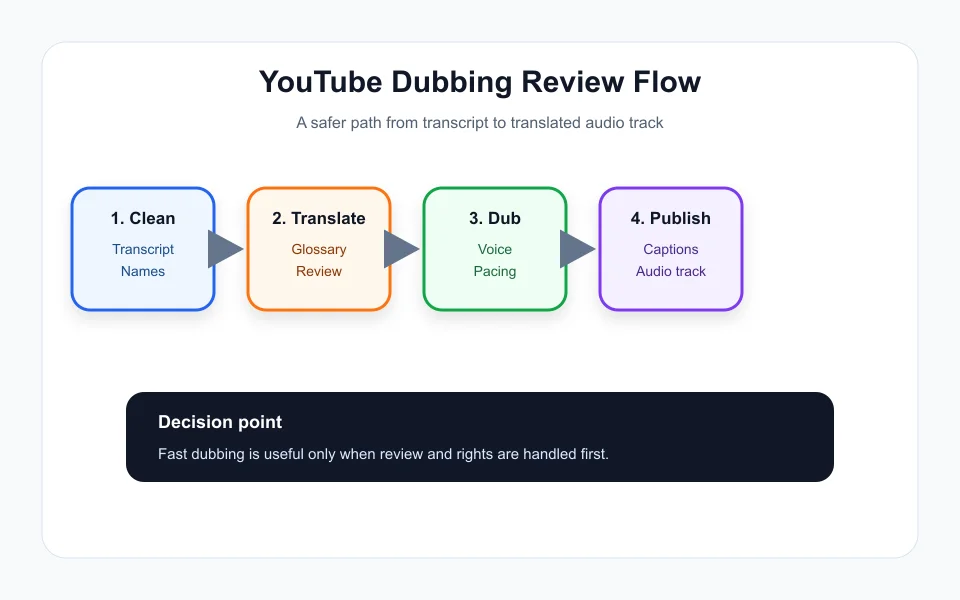
AI dubbing is only as good as the script it speaks. Before generating the final audio, review the transcript, remove filler, clarify unclear sentences, and check names. Then review the translated script with a fluent speaker or trusted reviewer when possible.
The best ai dubbing tools for youtube make this review step easy. Look for side-by-side script views, editable translations, glossary support, pronunciation controls, and the ability to regenerate only one section instead of the entire video.
This dubbing decision sits beside related creator workflow pieces like AI Social Media Caption Tools: How Creators Should Choose Without Sounding Generic, Runway vs Pika for Creators: Which AI Video Workflow Fits Your Content?, Opus Clip Alternatives for Creators: How to Pick the Right AI Clipping Workflow, AI Podcast Clip Generator: Turn Long Episodes Into Shorts Without Losing Context, and AI Voice Cloning Disclosure on YouTube: What Creators Should Check.
Check Rights, Disclosure, and Commercial Use
Before using an AI voice or cloned voice, read the rights and consent terms. Can you use the output on a monetized channel? Can you clone your own voice? Can team members create dubs? Can the tool use your input to train future models? These questions matter before the first upload.
The best ai dubbing tools for youtube should also support responsible disclosure when needed. If a platform labels auto-dubbed content or viewers can switch audio tracks, make sure your workflow matches that expectation.
Captions Still Matter
Dubbed audio does not replace captions. Captions help viewers in noisy environments, support accessibility, and help with translated metadata. When possible, produce captions after the final dubbed audio timing is locked so the subtitles match what viewers hear.
Creators should also localize titles and descriptions carefully. A direct translation may not match search behavior in the new language. Treat captions, title, description, thumbnail text, and audio as one localization package.
How to Pick a Tool
Run one real video through every candidate. Compare translation edit time, audio quality, speaker consistency, export format, caption handling, and upload fit. A cheap tool that requires hours of correction may cost more than a higher-priced tool with a cleaner review loop.
The best ai dubbing tools for youtube will reduce production time while keeping quality high enough that viewers stay. If the dub hurts retention or trust, wait until the workflow is stronger.
Quick Checklist
- Test with a real video, not only a sample script.
- Review transcript and translation before final audio generation.
- Confirm commercial use and voice consent terms.
- Export captions after final audio timing is locked.
- Check YouTube upload and multi-language audio workflow before scaling.
Bottom Line
The best ai dubbing tools for youtube combine voice quality with review control. Choose the workflow that protects meaning, rights, captions, and viewer trust. Start with one proven video, measure retention and comments in the new language, and expand only when the dubbing process feels repeatable instead of rushed. If the review step takes longer than recording a native voiceover, the tool is not ready for your channel workflow yet.
Frequently Asked Questions
What should creators compare in AI dubbing tools?
Compare translation review, voice quality, pronunciation controls, caption export, commercial rights, and whether the workflow fits YouTube upload needs.
Do AI dubs replace captions?
No. Captions still support accessibility, noisy viewing, search context, and viewers who prefer reading along with the dubbed audio.
Should creators clone their own voice for dubbing?
Only after checking consent, platform rules, commercial usage rights, and whether the voice output sounds natural in the target language.
Official sources: YouTube Help: Multi-language features · YouTube Help: Automatic dubbing. Check current program pages before applying.