Video Tools
How TikTok Creators Should Choose an AI Clip Generator
Find the best ai clip generator for tiktok creators by source video, captions, format control, export limits, and review workflow.

The best ai clip generator for tiktok creators is not always the flashiest text-to-video app. For most creators, the right choice is the one that can find a real hook in your footage, reframe it cleanly for vertical viewing, caption speech accurately, and still let you make the final judgment before posting.
Start with your source material. A podcast, webinar, livestream, talking-head YouTube video, product demo, and faceless script all need different AI help, so ranking every tool on one generic score usually leads you to the wrong editor.
| What you see | Likely cause | First move |
|---|---|---|
| Clips get views but weak follows | The AI picked drama, not the promise | Rewrite the first caption line around the audience payoff |
| Good moments feel rushed | Auto-cuts removed needed context | Restore one setup sentence before the punchline |
| Captions look busy | Template style is fighting the video | Use fewer words per line and test a calmer style |
| Export quality drops | Free-plan limits or wrong project settings | Check watermark, resolution, and format before batching |
| Every clip feels the same | The tool is optimizing for pattern, not voice | Build two reusable edit styles and alternate them |
The best ai clip generator for tiktok creators depends on your source video
Pick OpusClip-style clipping when you already have long footage with strong moments buried inside. It is built for repurposing, so it makes more sense for interviews, podcasts, livestreams, webinars, and YouTube videos than for a blank-page TikTok idea.
Choose CapCut or Canva when the job starts closer to creation than extraction. CapCut is stronger when you want TikTok-native editing, templates, captions, and quick sharing, while Canva fits creators who already manage brand assets, social graphics, and team review in one workspace.
Use InVideo, Renderforest, or similar script-to-video tools when you need fast concept videos from prompts, stock-like scenes, or product explainers. Honestly, I would be careful using these for personality-led accounts because they can look polished and still feel generic.
What actually matters before you pay
Source support comes first. If your workflow starts in YouTube, Zoom, Twitch, Riverside, or Google Drive, make sure the generator accepts that input without awkward downloads, because small friction kills a daily clipping habit.
Caption control is next. TikTok viewers often watch with sound off at first, so captions need readable line breaks, clean timing, and enough style control to match your account without burying the face, product, or demo.
Format control matters more than people admit. TikTok's ad guidance recognizes vertical 9:16, square 1:1, and horizontal 16:9 video, but organic creator clips usually need a strong vertical-first edit because that is how the feed is built.
Rights and disclosure checks also belong in the decision. If a tool adds AI voiceover, avatars, stock music, B-roll, or generated scenes, confirm the commercial-use terms and decide whether the clip needs a visible disclosure for your audience or platform policy.
Quick ranking by creator use case
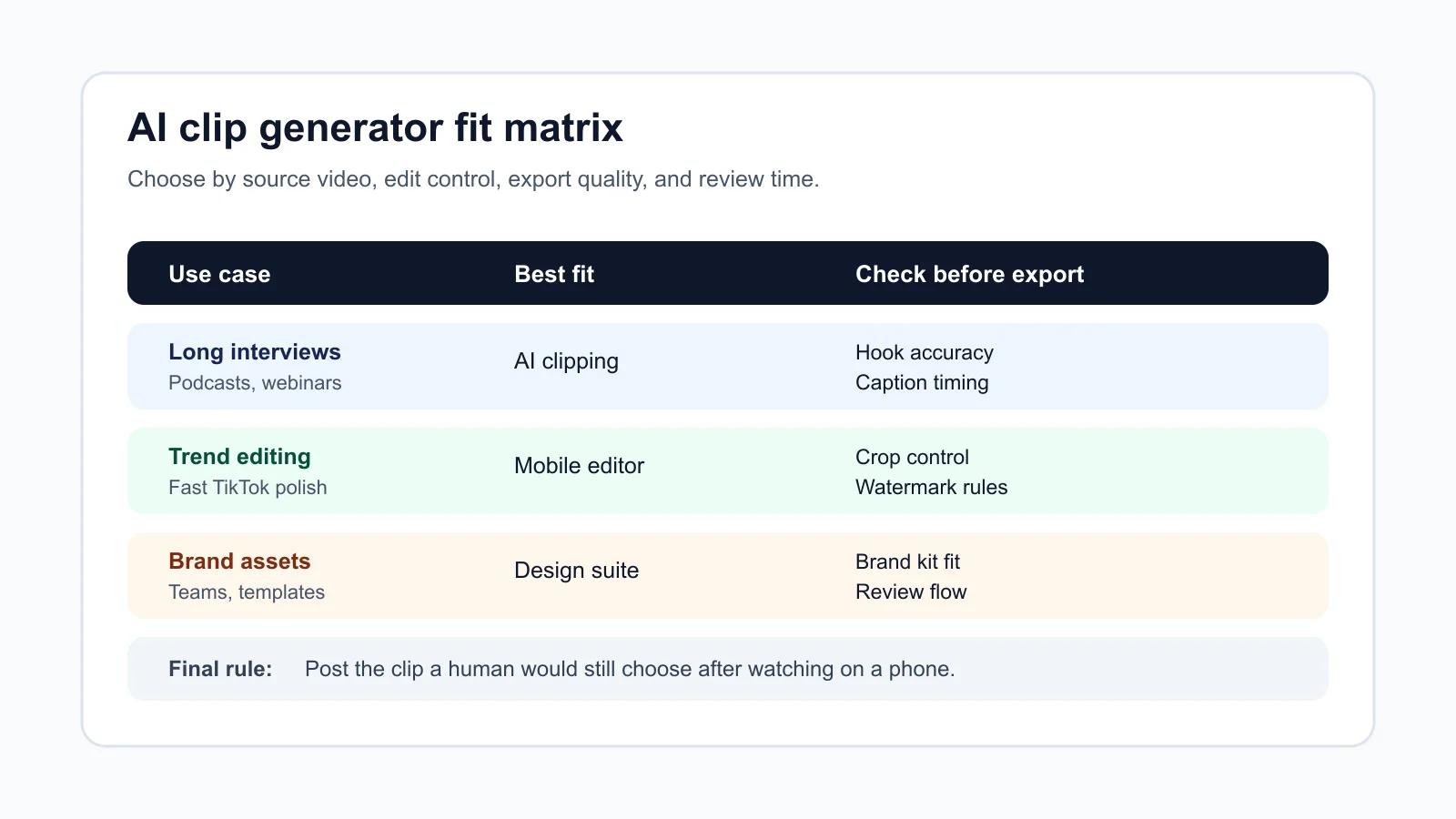
Best for long-form repurposing: OpusClip-style AI clipping. Use it when you have a library of long videos and want multiple candidate hooks quickly, then tighten the final edit yourself.
Best for TikTok-native editing: CapCut. Use it when captions, mobile-friendly templates, trend-aware edits, and final touch-ups matter as much as the AI selection.
Best for branded social assets: Canva. Use it when the TikTok is part of a broader content calendar that also needs thumbnails, carousels, newsletter graphics, and client or team review.
Best for prompt-led videos: InVideo or Renderforest-style generators. Use them for simple explainers, product snippets, and idea testing, not for deep creator personality.
Best for advanced visual experiments: Runway or Pika-style video tools. Use them when you are generating B-roll, surreal cutaways, or campaign visuals instead of simply finding clips in existing footage.
Workflow fit beats feature count
Batch generation sounds efficient until it creates twenty clips you do not trust. A better workflow is smaller: generate candidates, review the hook, fix captions, check the crop, then post only the version that still sounds like you.
Creators who repurpose shows should connect the clip generator to a repeatable pipeline. If audio is the starting point, compare this decision with how you turn a podcast into Reels and with a dedicated AI podcast clip generator.
YouTube-first creators may need a wider stack. A clipping tool can feed Shorts and TikTok, but a faceless YouTube tool stack, AI B-roll generators, and AI thumbnail tools solve different problems around production and packaging.
Course creators and newsletter operators should look beyond the clip itself. A course outline generator, newsletter repurposing workflow, and broader AI tools for newsletter creators can turn one idea into several useful assets.
Where AI clipping goes wrong
Hooks can become misleading if the AI grabs the loudest sentence without the setup. That might lift retention for a moment, but it trains the audience not to trust you.
Captions can also flatten your voice. If every word pops in the same template, the clip starts to look like everyone else's account, even when the original idea was sharp.
Generated B-roll needs extra care. For a tutorial, product review, or educational TikTok, use only visuals that support the claim on screen. If you need synthetic cutaways, compare the creative tradeoffs in Runway vs Pika workflow fit before treating generated video as filler.
How to test two tools in one afternoon
- Choose one source video with a clear audience, one useful lesson, and at least three potential hooks.
- Generate clips in both tools without editing the prompt too much.
- Reject any clip that needs more than five minutes of repair.
- Fix captions, framing, and the first two seconds on the best clip from each tool.
- Export both at the same quality level and review them on a phone before posting.
- Track saves, comments, profile clicks, and follows, not just views.
That test gives you cleaner evidence than a feature matrix. Views can spike for random reasons, but saves and follows usually tell you whether the clip carried enough value.
Related creator tools worth checking
Short-form performance depends on the whole publishing system, not one clipping button. Build around scripts, captions, audio, thumbnails, and disclosure so the tool helps your voice instead of replacing it.
- For caption voice and post copy, compare AI social media caption tools and a caption generator for Instagram Reels.
- For thumbnails and visual testing, use thumbnail A/B testing workflow and AI image generator rights checks.
- For voice workflows, review AI dubbing tools for YouTube, ElevenLabs alternatives, and voice cloning disclosure checks.
- For editor comparisons, read Opus Clip alternatives, Descript alternatives, and CapCut vs Descript.
- For planning the whole month, pair clips with an AI content calendar generator.
Quick Checklist
- Match the tool to your source: long video, prompt, product demo, or faceless script.
- Check vertical crop control before judging the AI's clip choices.
- Review captions on a phone, not only on a desktop preview.
- Confirm watermark, export resolution, and clip ownership rules before batching.
- Keep a human edit pass for hook accuracy and brand voice.
- Track saves, comments, profile clicks, and follows after posting.
- Retest every few months because AI video tools change quickly.
Frequently Asked Questions
what is the best AI clip generator for TikTok?
For creators repurposing long videos, OpusClip-style tools are usually the best first test. For TikTok-native editing and fast polish, CapCut is often the better everyday editor.
can AI make TikTok clips from a YouTube video?
Yes, many AI clipping tools can analyze long YouTube videos and suggest short clips. Always check whether the tool supports direct links, uploads, captions, reframing, and the export quality you need.
is CapCut better than OpusClip for TikTok creators?
CapCut is better when you want hands-on TikTok editing, templates, captions, and final polish. OpusClip is better when your main job is finding strong moments inside long videos.
do AI TikTok clip generators add captions automatically?
Most serious clipping tools include automatic captions, but quality varies. Test timing, line breaks, language support, style control, and how easy it is to fix mistakes before you publish.
should I use AI generated B-roll in TikTok clips?
Use it only when it supports the point of the clip. For tutorials, reviews, or advice content, inaccurate B-roll can make the whole video feel less trustworthy.
A good AI clip generator should save time without taking over your taste. Pick the tool that helps you find better moments, keep your vertical edit clean, and protect the reason people followed you in the first place.
Primary sources checked: TikTok ad format and functionality guidance and OpusClip product page.