Audio Tools
Choosing a Copyright-Safe AI Music Generator for Creator Workflows
Choose the best ai music generator for creators copyright safe enough for YouTube, courses, podcasts, client videos, and ads.
Finding the best ai music generator for creators copyright safe enough for YouTube, podcasts, ads, courses, and client work is less about who makes the catchiest loop and more about who gives you usable rights, clean documentation, and a workflow you can defend later.
Creators usually discover the problem after the track already sounds good. A beat fits the edit, the upload is scheduled, and then the license language gets vague right when you need confidence. That is the moment to slow down.
| What you see | Likely cause | First move |
|---|---|---|
| A tool says "royalty-free" but not "commercial use" | The marketing page is simpler than the license | Find the paid-plan license and download terms before exporting |
| YouTube flags the audio after publishing | The track may be registered, matched, or reused by many creators | Keep the license certificate, track ID, and export date together |
| A client wants music for ads | Client, paid media, and broadcast rights can differ from creator rights | Check whether client work and paid advertising are allowed |
| The tool owns the output | You may receive a usage license rather than copyright ownership | Confirm whether a non-exclusive license is enough for your project |
What "Copyright Safe" Should Mean Before You Download
Start with the practical question: can you publish and monetize the finished work without paying extra royalties or chasing permission later? For most creators, that matters more than whether the platform uses the phrase "AI music" or "stock music."
Look for a written license that covers your actual channel: YouTube monetization, podcast distribution, online courses, newsletters with audio, client videos, paid social ads, and commercial brand content. A vague promise on a homepage is not enough.
Best AI Music Generator for Creators Copyright Safe: How to Shortlist Tools
Use the exact-match question as a filter, not as a shopping list. A copyright-safe AI music generator should explain training data, commercial rights, permitted platforms, paid-plan limits, and what happens if a copyright claim appears.
SOUNDRAW is strong for creators who want simple background music with a clear copyright-safety pitch. Its official license materials say tracks are royalty-free under its terms, and its public positioning emphasizes in-house music input rather than scraped songs.
Beatoven.ai is worth checking when you want background scores for videos, podcasts, games, or branded projects and you care about a perpetual license model. Read the current plan details before assuming the same rights apply to every export.
Mubert fits creators who need fast, mood-based tracks for videos, podcasts, apps, or social content. Treat its licensing page as required reading, especially if you are publishing client projects or monetized content across several platforms.
AIVA, Soundful, Loudly, and similar tools can also fit, but the deciding factor is not the prettiest interface. It is whether the license is specific enough for the work you actually sell, publish, or monetize.
Creator Use Cases That Change the Risk Level
A personal YouTube vlog and a sponsored campaign do not carry the same risk. Neither does a free podcast intro compared with a course module that stays on sale for years.
For YouTube creators, pay close attention to monetization, Content ID, track reuse, and whether the platform helps resolve claims. If you also use AI voice, AI avatars, or realistic synthetic scenes, keep YouTube's AI disclosure rules in mind as a separate upload decision.
For course creators, the issue is longevity. A track buried inside a paid lesson needs a license that survives account changes, subscription cancellation, and future edits.
For agencies and freelancers, client transfer matters. Some plans allow you to use music in your own content but restrict work made for clients, ads, broadcast, or resale.
License Checks That Matter More Than the Audio Quality
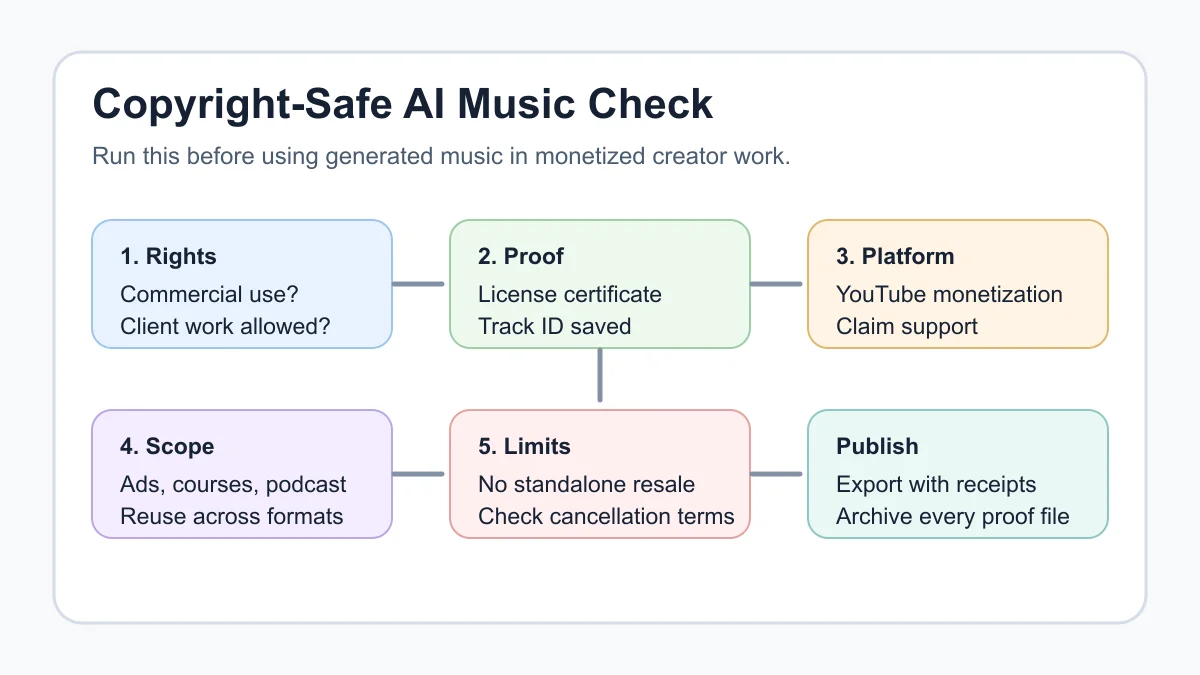
Great music is useless if the license does not match the job. Honestly, this is where a lot of creator roundups get too casual.
- Commercial use: Confirm whether monetized channels, sponsors, client work, paid ads, and courses are covered.
- Perpetual rights: Check whether you can keep using downloaded tracks after canceling a subscription.
- Exclusivity: Most creator tools are non-exclusive, meaning other creators may generate or license similar tracks.
- Attribution: Free tiers may require credit, while paid tiers may remove that requirement.
- Content ID and claims: Look for a dispute process, license certificate, or track documentation.
- Redistribution: Avoid using generated music as a standalone music product unless the license clearly allows it.
How to Test a Music Tool Before You Trust It
Run a small publishing test before using any generator in a high-value project. Create one short track, download the license proof, export the finished video privately or unlisted where possible, and watch for platform warnings.
Then test the creative side. Can you set duration precisely? Can you remove a distracting instrument? Can you make a loop that does not sound obviously machine-made after the third listen?
For a broader production stack, pair the music test with your video and voice workflows. A creator using an AI video generator stack for short-form creators, an AI voice changer workflow, or AI dubbing tools for YouTube needs one clean rights folder for every asset, not separate guesses scattered across apps.
Where AI Music Fits in the Creator Stack
Music is rarely the whole workflow. It usually sits under scripts, voice, B-roll, captions, thumbnails, and repurposed clips.
If your channel depends on scripted videos, choose music after the hook and pacing are clear. Our guides to AI scriptwriting tools and AI YouTube title tools can help you set the creative direction before you score the edit.
Short-form creators should think in repeatable systems. A track that works for one Reel may need stems, cutdowns, and safe reuse across an AI clip generator guide for TikTok creators, a podcast-to-Reels workflow, or a AI B-roll generator guide.
Brand-heavy creators also need visual consistency. That is where a Canva AI vs Adobe Express comparison, AI thumbnail AB testing tools, and a AI content calendar generator can keep the music from feeling bolted on at the end.
A Practical Buying Framework
Pick a tool based on the job you publish most often, then confirm the edge cases. A YouTuber needs reliable monetization and claim support. A newsletter creator may care more about podcast intros and audio snippets. A course creator needs long-lived rights.
Use this order when deciding:
- Define the publishing channel and whether the work is monetized.
- Check commercial rights, attribution, and cancellation terms.
- Generate three tracks in your real format, not a demo prompt.
- Save license evidence for each downloaded track.
- Test the music inside an actual edit before paying annually.
Creators building a faceless channel or audio-led brand should also review the faceless YouTube tool stack, AI podcast clip generator, and AI voice cloning disclosure checks. Rights questions multiply when music, synthetic voice, and generated visuals meet in one upload.
Common Mistakes That Create Copyright Headaches
Relying on a free-tier export for client work is the first mistake. Assuming a subscription means lifetime rights is the second.
Another one: using the same downloaded track across dozens of channels without checking whether the license allows that scale. Some tools are generous, some are narrow, and some bury the answer in plan-specific terms.
Do not ignore workflow fit either. If you use solo creator repurposing workflow systems, AI newsletter repurposing workflow assets, AI social media caption tools, or AI course outline generator guide, make sure the same audio license covers every format you spin out.
Tool Comparison Notes for Creators
Comparison pages are useful, but only if they respect the actual production context. A cinematic YouTube essay, a daily Shorts channel, and a paid course do not need the same music system.
If you are already comparing creative tools, keep rights checks beside workflow checks. The same mindset applies when reading Runway vs Pika creator workflow notes or Opus Clip alternatives: output quality gets attention, but export rights and platform behavior decide whether the asset is safe to ship.
Quick Checklist
- Match the license to the exact channel: YouTube, podcast, course, ad, or client project.
- Confirm commercial use, attribution rules, and post-cancellation rights before downloading.
- Save license proof, track IDs, export dates, and invoices in one project folder.
- Check whether Content ID claims are possible and how the tool helps resolve them.
- Avoid redistributing generated tracks as standalone music unless the terms clearly allow it.
- Run a small real-world test before using the tool in a sponsored or evergreen project.
- Re-check terms before annual renewal, because licensing pages can change.
The safest choice is not always the flashiest AI music generator. Pick the tool that gives you a clear license, clean documentation, useful editing controls, and enough confidence to publish without wondering what happens after the upload goes live.
Frequently Asked Questions
what is the best ai music generator for youtube creators?
The best choice depends on your rights needs. For YouTube, prioritize commercial monetization rights, Content ID support, license proof, and easy track editing before comparing style presets.
is ai generated music copyright free?
Not automatically. Some tools give you a royalty-free license, some keep ownership while granting usage rights, and some restrict commercial or client work. Always read the license attached to the downloaded track.
can i monetize youtube videos with ai music?
You can if the tool's license allows monetized YouTube use and you follow platform rules. Keep proof of the license in case a claim or client question appears later.
do i need to disclose ai music on youtube?
Background AI music by itself is usually different from realistic altered or synthetic video content, but YouTube has disclosure rules for realistic AI-generated or altered content. Check the current upload prompt when publishing.
which ai music generator is safest for client work?
Choose the generator with the clearest client and commercial-use terms, not just the best audio preview. If the license does not mention client projects or paid media, ask support before using it.
Official sources: SOUNDRAW License · YouTube altered or synthetic content disclosure. Check current program pages before applying.