AI Writing
Best AI Scriptwriting Tools for Creators Who Need Better Drafts
Compare the best ai scriptwriting tools for creators by workflow, from YouTube drafts to podcast outlines, Reels, and review checks.
If you are comparing the best ai scriptwriting tools for creators, start with the job the script has to do: hold attention, sound like you, and give the edit team something usable. A tool that drafts a clean YouTube outline may be the wrong fit for a podcast cold open, a course lesson, or a faceless explainer.
Pick by workflow first. The strongest setup usually combines one flexible writing model, one production-aware editor, and a simple review process that keeps claims, pacing, and disclosure under your control.
| What you see | Likely cause | First move |
|---|---|---|
| Every script opens the same way | The prompt asks for a generic hook | Feed it your last three strong intros and ask for pattern-matched options |
| The draft sounds polished but bland | The tool has no channel voice notes | Add banned phrases, audience context, and one sample paragraph |
| The script is hard to edit | Scenes, beats, and B-roll are mixed together | Require separate columns for narration, visuals, and notes |
| Facts feel shaky | The model is filling gaps instead of checking sources | Make research links and claim checks a separate pass |
| Shorts lose the point | The clip is cut before the setup pays off | Write the long-form beat first, then adapt it for short-form |
Best AI Scriptwriting Tools for Creators: The Shortlist
Use this list as a workflow map, not a trophy ranking. Most creators need different script help at different moments: idea testing, hook variations, full drafts, rewrites, scene planning, captions, and repurposing.
| Tool type | Best fit | Watch out for |
|---|---|---|
| ChatGPT or a general AI assistant | Flexible outlines, hooks, rewrites, and channel voice experiments | Needs strong examples or it can drift into safe, familiar phrasing |
| Claude-style long-context writer | Long scripts, course lessons, newsletter-to-video drafts, and deeper revision passes | Still needs source checks before you record |
| Descript script tools | Creators who want the script close to the audio or video editing workflow | Great for production flow, but not a substitute for editorial judgment |
| Notion AI or workspace AI | Planning scripts beside calendars, briefs, sponsor notes, and research | Easy to over-organize before the hook is proven |
| Squibler, Sudowrite, or story-first tools | Narrative channels, fiction podcasts, docu-style episodes, and character-driven videos | May be too story-heavy for practical tutorials or news explainers |
| Screenwriting apps with AI assists | Creators who need scenes, dialogue, and formatting discipline | Often more than a YouTube or Reels creator needs |
How to Match the Tool to the Script You Actually Make
Short-form creators need speed and variation. Ask for ten hooks, five payoff lines, and three tighter rewrites instead of one full script. Pair that with a clipping workflow such as an AI clip generator for TikTok creators when you are turning one idea into several versions.
YouTube creators need structure before sentences. For a talking-head video, ask the tool for a cold open, promise, context, three proof points, objection handling, and a close. Then connect the script to your broader production stack, especially if you already use AI faceless video tools for YouTube or AI B-roll generators for YouTube.
Podcast creators usually need retention without sounding scripted. Start with a rundown, write transitions, then create social cuts with an AI podcast clip generator or a workflow that can turn a podcast into Reels without flattening the original point.
Course creators need a different bar. A script has to teach in sequence, not just sound punchy. If that is your lane, draft the lesson map first with an AI course outline generator, then ask the script tool to write one module at a time.
Where General AI Assistants Still Win
General assistants are still the most flexible choice for creators who publish across formats. They can turn a messy brief into a YouTube outline, rewrite a hook for Shorts, draft a sponsor read, and tighten a newsletter intro in the same session.
That flexibility matters because creator work rarely stays inside one tool. A good script may become a YouTube title, a thumbnail angle, an email, a carousel, and a caption. Keep those handoffs close by using related workflows such as AI YouTube title generator tools, AI social media caption tools, and an AI caption generator for Instagram Reels.
Here is the catch. General tools reward creators who bring examples. Give the assistant a previous script that performed well, explain why it worked, and ask it to preserve the rhythm without copying the words.
When a Production-Aware Tool Is Better
Production-aware tools help when the script has to move straight into editing. Descript is the clearest example for many video and podcast creators because the writing, recording, transcript, and edit can live close together.
Use this kind of tool when your script needs scene notes, voiceover blocks, or quick repurposing. It is especially useful after you have recorded a podcast or long video and need a second asset, like a teaser, a short, or a newsletter summary.
Production tools also make visual planning easier. If the episode needs generated clips, compare options like Runway vs Pika for creators. If the script is meant to create many short clips, check Opus Clip alternatives for creators before locking the format.
The Prompt Pattern That Gets Better First Drafts
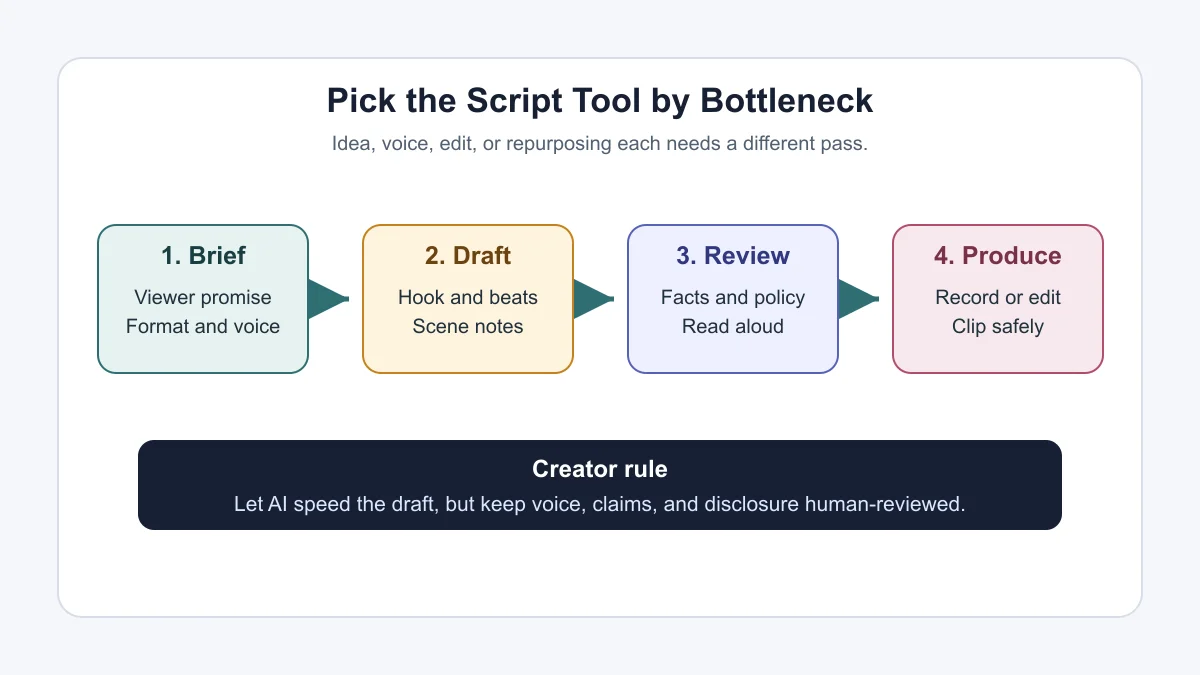
Weak prompts ask for "a script about this topic." Better prompts describe the viewer, the promise, the proof, the platform, the length, and the voice. That extra setup keeps the draft from becoming a generic explainer.
Use this pattern:
- Audience: Who is watching, and what do they already believe?
- Outcome: What should they know, choose, or do by the end?
- Format: YouTube video, podcast intro, Reel, tutorial, webinar, course lesson, or sponsor read.
- Structure: Hook, setup, proof, steps, objections, payoff, and close.
- Voice: Paste a short sample and name what should carry over.
- Constraints: Banned phrases, claims that need sources, disclosure notes, and target length.
- Output: Ask for narration, visual notes, title ideas, and caption angles separately.
Run a second pass only for rhythm. Ask for shorter sentences where the viewer may drop off, stronger transitions before each new point, and simpler phrasing where the script sounds like a blog post.
AI Scriptwriting Workflow for YouTube, Podcasts, and Reels
Start with the core idea, then choose the main asset. If the main asset is a YouTube video, the script should include retention beats, on-screen moments, and a title promise. If the main asset is a podcast, the script should sound like a conversation, with fewer perfect sentences and more useful prompts for the host.
Once the long-form script works, repurpose it. A solo creator can use an AI content repurposing workflow to turn one script into shorts, captions, newsletters, and community posts. Newsletter creators can go deeper with AI newsletter repurposing or a broader guide to AI tools for newsletter creators.
Build the calendar around production reality. A tool like an AI content calendar generator for creators can organize topics, but it cannot tell you which script needs a studio day, which one needs screen capture, and which one depends on sponsor approval.
What to Check Before You Record
Read the script out loud. You will catch most of the fake-polished lines in the first two minutes. If a sentence looks smart but feels awkward in your mouth, rewrite it before the camera is rolling.
Check claims separately from style. AI can help you draft, but it may blur facts, product capabilities, pricing, and policy language. For tool guides, open the official product page before you mention specific features. For YouTube videos that use realistic AI-altered visuals, voices, or likenesses, review platform disclosure guidance before upload.
Rights matter too. If a script calls for cloned voices, synthetic presenters, or realistic likenesses, read your policy notes before production. Our guide to AI voice cloning disclosure on YouTube is a useful companion, and AI dubbing tools for YouTube have their own consent and voice-quality checks.
How to Use AI Without Losing Your Voice
Give the tool your actual editorial rules. If your channel never says "game-changing," ban it. If your intros always start with a problem instead of a greeting, say that. If your audience hates hype, write that into the prompt.
Save a voice brief. Include three sentences that sound like you, three phrases you never use, one strong hook, and one example of a sponsor line that felt natural. Reuse that brief for every script draft.
Visual identity counts here as well. A script that promises one angle should match the thumbnail, title, and image style. For that side of the workflow, compare AI thumbnail AB testing tools, AI thumbnail tools for YouTube, and an AI image generator for creators before the script creates visual work your team cannot support.
Quick Checklist
- Choose the tool by script format: YouTube, podcast, Reel, lesson, webinar, or sponsor read.
- Paste a real voice sample before asking for a full draft.
- Ask for narration and edit notes in separate columns.
- Run a fact-check pass before recording any product, policy, or pricing claim.
- Read the script out loud and rewrite anything that sounds too polished.
- Adapt the approved script into titles, captions, clips, and newsletters after the main asset is solid.
- Check disclosure and rights rules when using synthetic voices, likenesses, or realistic AI-altered visuals.
Frequently Asked Questions
what is the best ai tool for writing youtube scripts?
For most YouTube creators, a general AI assistant is the best starting point because it can draft hooks, outlines, rewrites, and title angles. Add a production-aware tool when you want the script to move directly into editing.
are ai scriptwriting tools good for creators?
Yes, if you use them for drafts, structure, and variations rather than outsourcing judgment. They are strongest when you provide audience notes, examples, source links, and clear voice rules.
can ai write podcast scripts?
AI can write podcast outlines, intros, ad reads, segment prompts, and show notes. Full word-for-word podcast scripts often sound stiff, so many hosts use AI for structure and transitions instead.
what should creators check before using an ai script?
Check factual claims, product details, policy language, sponsor requirements, disclosure needs, and whether the script sounds natural when read aloud. The recording should not be the first review pass.
which ai scriptwriting tool is best for short videos?
Short videos need hook variation and tight payoffs. Use a general AI assistant for options, then pair it with a short-form editing or clipping workflow if you are making Reels, Shorts, or TikTok clips from long content.
Bottom Line
The right AI scriptwriting tool is the one that fits your production bottleneck. If ideas are slow, use a flexible writing assistant. If edits are slow, use a tool closer to the timeline. If your voice keeps disappearing, fix the brief before blaming the model.
Keep the final call human. The script should sound like your channel, support the edit, and make claims you can stand behind after publishing.
Official sources: Descript AI Script Generator · YouTube Help: disclosing GenAI content.