Audio Tools
Descript or Adobe Podcast: Which Audio Cleanup Tool Fits Your Creator Workflow?
Descript vs adobe podcast compared for creators: audio quality, workflow fit, limits, and which tool to use for cleanup.
If you are searching for descript vs adobe podcast, you probably do not need another vague "both are good" answer. You need to know which tool will save your recording, which one fits your editing flow, and where each one can make a voice sound too processed.
Short version: Adobe Podcast is the faster cleanup lane, while Descript is the better editing workspace. The right pick depends on whether you are fixing one rough voice file or producing a full episode, course lesson, YouTube voiceover, or interview.
descript vs adobe podcast: the fast verdict
| What you see | Likely cause | First move |
|---|---|---|
| Voice sounds clear but robotic | Enhancement strength is too high | Reduce the effect and compare with the original |
| Room echo remains after cleanup | Reflections are baked into the voice | Try Descript Studio Sound, then edit problem sections manually |
| Background hum disappears but words smear | Noise overlaps the speaker | Test Adobe Podcast and Descript on a 60-second sample |
| Episode needs cuts, captions, and clips | Cleanup is only one part of production | Use Descript as the main workspace |
| You only need a quick file repair | No timeline edit is needed | Try Adobe Podcast Enhance Speech first |
Pick Adobe Podcast when you want a browser-based speech cleanup tool that is quick, focused, and easy to hand to a non-editor. Adobe says Enhance Speech removes noise and echo from voice recordings, and its plans page now separates the free audio-only limits from Premium features such as video support, bulk upload, strength adjustment, and longer daily processing.
Pick Descript when cleanup is part of a bigger creator workflow. Descript Studio Sound sits inside an editor with transcription, timeline work, filler-word removal, captions, multitrack podcast editing, and video export. That matters when you still need to cut dead air, fix a bad answer, pull Shorts, or repurpose the finished episode.
Where Adobe Podcast wins
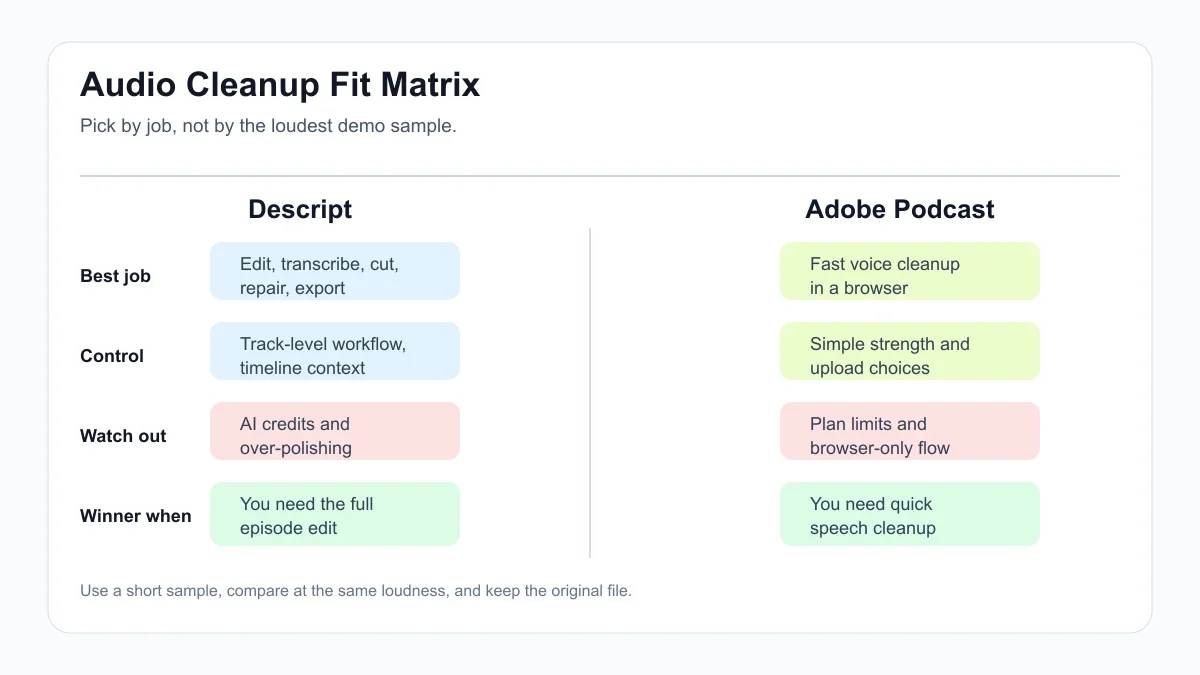
Adobe Podcast is strongest when the job is narrow: upload a spoken recording, clean it, download it, move on. For solo creators, that simplicity is the point. You do not have to learn a timeline just to rescue a voice memo, a remote guest clip, or a rough talking-head track.
Free-plan limits matter, though. Adobe's current plans page lists free Enhance Speech as audio-only, one upload at a time, with no strength adjustment, up to 30 minutes per file and up to one hour per day. Premium adds video support, bulk processing, strength adjustment, and higher limits, up to four hours per day and files up to 1 GB.
That makes descript vs adobe podcast a practical question about volume. If you process a few short files each week, Adobe's free tier may be enough. If you handle longer episodes, batches, or video files, you will hit the workflow wall faster.
Where Descript wins
Descript wins when you want the audio repair step to stay connected to editing. Studio Sound can be toggled in the project, adjusted for intensity, and applied in context while you edit the transcript and timeline.
Descript's help docs describe Studio Sound as an AI-powered audio effect that reduces background noise, echo, and other distractions. They also note that it requires an internet connection, applies at the file level once enabled, and uses AI Credits on current plans. That last part matters for creators who process a lot of media.
For podcasts and video essays, Descript often feels less like a cleanup tool and more like a production desk. You can clean the track, cut by transcript, remove filler words, build clips, and keep moving without exporting between apps.
Audio quality: natural beats dramatic
Most descript vs adobe podcast comparisons focus on which tool sounds more "studio." That is the wrong target. For creator work, natural speech usually beats dramatic cleanup because viewers forgive mild room tone faster than they forgive a voice that sounds synthetic.
Adobe Podcast can be excellent for strong background noise, especially when the speaker is clear and centered. It can also push a voice into that glossy, rebuilt sound if the original file is rough. Descript Studio Sound can feel more controllable inside an edit, but it can still overdo the repair if the intensity is left too high.
Use headphones and speakers. Check consonants. Listen for words that blur together. If your audience watches on phones, test on a phone speaker too.
Workflow fit for YouTubers, podcasters, and course creators
YouTubers who already edit elsewhere may like Adobe Podcast as a quick pre-processing step. Clean the narration, bring it into Premiere, Final Cut, CapCut, DaVinci Resolve, or your usual editor, and keep the video workflow unchanged.
Podcasters and course creators should look harder at Descript. The value is not only Studio Sound. It is the way cleanup, transcript edits, captions, clips, and exports live together. If you are building a broader production stack, our AI tool stack for podcast creators guide pairs well with this comparison.
Short-form creators have a different problem: speed. If you turn episodes into Reels, Shorts, and TikToks, audio cleanup is only the first step. Pair this decision with the turn a podcast into Reels with AI workflow and the AI clip generator guide for TikTok creators before you pay for another tool.
Cost and plan constraints to check
Do not compare only headline prices. Compare limits. Adobe Podcast free may be enough for occasional short audio, while Premium becomes more relevant when you need video files, batches, longer daily processing, or strength control.
Descript needs a broader calculation. Studio Sound uses AI Credits on current plans, and Descript may replace several other tools if you also need transcription, transcript editing, screen recording, captions, and repurposing. For some creators, that consolidation is worth more than the audio cleanup alone.
In plain English, descript vs adobe podcast is not a winner-take-all fight. Adobe Podcast is a cleaner single-purpose lane. Descript is the better all-in editor when production has more moving parts.
Decision guide
Choose Adobe Podcast if you want the simplest path from rough voice file to cleaner audio, especially for short solo recordings. Choose Descript if the repaired audio still needs editing, captions, clips, or a full podcast/video workflow.
For YouTube creators, my default recommendation is simple: try Adobe Podcast first for one-off cleanup, but choose Descript if you are building a repeatable publishing system. That is where the extra workspace starts to pay for itself.
Related creator workflow guides
Use these next if your audio cleanup choice is part of a larger AI production stack:
- AI Shorts Caption Generator workflow
- AI tool stack for podcast creators
- AI video background remover tools
- AI avatar video tool guide
- AI Instagram repurposing tools
- copyright-safe AI music generator guide
- AI video generator stack for short-form creators
- AI voice changer workflow guide
- Canva AI vs Adobe Express comparison
- AI scriptwriting tools for creators
- AI YouTube title generator guide
- solo creator repurposing workflow
- AI clip generator guide for TikTok creators
- turn a podcast into Reels with AI
- faceless YouTube AI tool stack
- AI course outline generator guide
- AI thumbnail A/B testing tools
- AI dubbing tools for YouTube
- AI social media caption tools
- Runway vs Pika creator workflow comparison
Quick Checklist
- Export a 60-second sample with normal speech, noise, and one hard section.
- Test the same file in both tools before judging the result.
- Lower the cleanup strength if voices sound rebuilt or metallic.
- Check Adobe Podcast file, duration, video, and daily limits before batching.
- Check Descript AI Credit usage if you process long shows or many clips.
- Keep the original recording so you can repair sections manually later.
- Pick the tool that fits the rest of your edit, not just the prettiest sample.
For most creators, the best answer is not permanent. Use Adobe Podcast when you need a fast repair. Use Descript when audio cleanup needs to live inside a real editing workflow. That is the practical answer to descript vs adobe podcast.
Frequently Asked Questions
is adobe podcast better than descript?
Adobe Podcast can be better for quick speech cleanup, especially if you only need to process a short audio file. Descript is usually better when you also need transcript editing, captions, clips, and a full episode workflow.
does descript studio sound remove background noise?
Yes. Descript says Studio Sound reduces background noise, echo, and other distractions. Results still depend on the source recording, so keep the original file and avoid pushing the effect too hard.
is adobe podcast enhance speech free?
Adobe Podcast has a free Enhance Speech option, but current free limits are audio-only, one file at a time, no strength adjustment, up to 30 minutes per file, and up to one hour per day.
descript vs adobe podcast for youtube voiceovers?
For one-off narration cleanup, Adobe Podcast is often faster. For YouTube voiceovers that need cuts, captions, Shorts, and repurposing, Descript usually fits the creator workflow better.
can i use both adobe podcast and descript?
Yes. Some creators clean a rough file in Adobe Podcast, then edit in Descript. Just compare that against using Studio Sound inside Descript, because extra exporting can slow you down.
Official sources: Descript Studio Sound help · Adobe Podcast plans. Check current program pages before applying.