Creator Workflows
The Best AI Course Creation Tools for Building Lessons That Sell
Compare the best ai course creation tools by workflow, from outlines and lessons to quizzes, videos, publishing, and launch assets.

If you are comparing the best ai course creation tools, start with a more practical question: where does your course actually get stuck? Some creators need a sharper outline, some need faster lesson drafts, and others need video, quizzes, checkout, or learner delivery.
Tool lists get messy because "course creation" can mean five different jobs. A smart stack separates planning, authoring, production, publishing, and repurposing before you pay for another subscription.
| What you see | Likely cause | First move |
|---|---|---|
| You have ideas but no lesson order | The tool is drafting content before the course map exists | Use an outline-first workflow and define the learner outcome |
| Lessons feel like blog posts | The AI is writing information, not instruction | Ask for examples, practice prompts, checks for understanding, and recap moments |
| Video production slows everything down | The authoring tool is not connected to your recording workflow | Choose a tool that exports scripts, slides, or scenes cleanly |
| Students do not finish modules | The course is too dense or lacks feedback loops | Add short lessons, quizzes, worksheets, and progress markers |
| The launch page is still blank | You picked a lesson builder but not a selling platform | Decide whether you need hosting, checkout, email, and community features |
Best AI Course Creation Tools: Where Each Type Fits
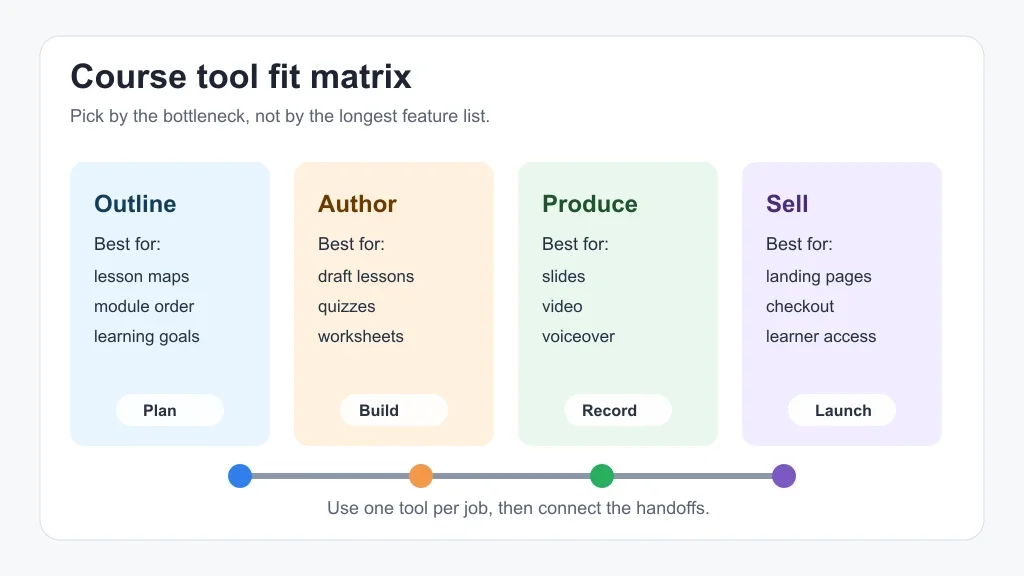
Use this as a workflow map, not a universal ranking. The right choice depends on whether you are building a lead magnet mini-course, a paid cohort, a self-paced video course, an internal training program, or a creator product that needs to sit beside newsletters, videos, and social clips.
| Tool type | Best fit | Watch out for |
|---|---|---|
| Outline generators | Turning expertise into modules, lessons, and learning objectives | They can overbuild a course before you validate demand |
| AI authoring platforms | Drafting lessons, quizzes, assessments, and training paths from source material | Outputs still need editorial review and examples from your own audience |
| Design-first tools | Slides, workbooks, visual lessons, lead magnets, and student downloads | Pretty materials can hide a weak teaching sequence |
| AI video tools | Presenter videos, voiceovers, demos, and module intros without a full studio day | Disclosure, voice rights, and learner trust matter more when faces or voices are synthetic |
| LMS and course commerce platforms | Hosting, checkout, access control, progress tracking, and student management | AI features may be secondary to payments, delivery, and support |
Start With the Course Job, Not the Tool Demo
Begin with the asset you are trying to publish. A YouTube creator turning a channel topic into a paid mini-course needs a different setup than a consultant converting workshops into internal training. So does a newsletter creator packaging templates and lessons for subscribers.
For structure, a dedicated AI course outline generator is often the cleanest first step. It helps you define the promise, module sequence, lesson length, and practice moments before a general writing model starts filling pages with passable but unfocused copy.
After the outline works, connect it to the rest of your creator workflow. Course scripts often overlap with AI scriptwriting tools for creators, title testing with AI YouTube title generator tools, and repurposing with a solo creator AI content repurposing workflow.
Outline and Lesson Planning Tools
Planning tools are the quiet workhorses in a course stack. They help you turn a broad idea like "teach Notion for freelancers" into a sequence of modules, outcomes, lessons, assignments, and checkpoints.
Look for tools that ask about learner level, course promise, lesson format, and assessment style. If the first output is just a long table of contents, ask the tool to add "student can now" statements after every lesson. That one change makes the course easier to edit.
Creators who already publish long-form content can feed the outline tool transcripts, newsletters, or existing scripts. Podcast creators can build from a broader AI podcast creator stack, then turn strong episodes into modules. Video creators can do the same from existing tutorials or explainers.
AI Authoring Platforms for Lessons, Quizzes, and Assessments
Authoring platforms are useful when your source material is already strong. Coursebox, for example, positions its product around AI course creation, eLearning authoring, quizzes, tutoring, grading, and file-to-course workflows. Canva's AI course creator focuses more on generating and designing course materials inside a familiar visual workspace.
That split matters. If you need assessments, learner paths, and training-style output, an authoring platform may save more time. If you need polished handouts, lesson visuals, and lightweight course materials, a design-first tool can be the better fit.
Ask any authoring tool for three passes: a learner path, a draft lesson, and an assessment plan. Then review the assessment separately. AI quizzes can look tidy while testing recall instead of practical skill, and that is where many creator courses feel thin.
Design-First Course Tools
Design-first tools make sense when your course depends on slides, worksheets, templates, checklists, and short visual lessons. They are especially useful for creators who sell lightweight products, workshops, or mini-courses rather than a full LMS experience.
Canva sits in this lane because creators can move from draft to visual asset quickly. The tradeoff is that good design does not automatically create good instruction. You still need a course promise, practice, examples, and a reason for every slide.
Visual creators should connect this layer to the rest of their media stack. A course thumbnail or lesson graphic may start with Midjourney or Ideogram for creator workflows, get tested through AI thumbnail AB testing tools, and then become a reusable visual system inside the course.
Video, Audio, and Avatar Tools for Course Modules
Course video is where many projects stall. A polished outline is easy to approve, but recording twenty lessons takes energy, editing time, and a consistent production setup.
AI video tools can help with module intros, avatar-led explainers, translated versions, B-roll, and short demonstrations. If synthetic presenters are involved, be direct with students and check each platform's rights, consent, and disclosure rules before you publish.
For video-heavy courses, compare AI avatar video tools for creators, AI video generator stacks for short-form creators, and AI video background removers. If your course uses clips to drive enrollment, a workflow for AI Shorts captions or AI clip generation for TikTok creators can turn one lesson into useful promo material.
Audio deserves the same care. Clean sound, captions, and accessible pacing matter more than flashy motion. Compare Descript and Adobe Podcast for cleanup, consider AI voice changers for creator workflows only when they fit the brand, and check AI dubbing tools for YouTube if multilingual lessons are part of the plan.
Publishing, Selling, and Student Delivery
A course is not finished when the lessons are drafted. You still need hosting, payment, access, emails, support, updates, and a way to tell students what to do next.
If you want one place for sales and delivery, look at LMS or course commerce platforms before you obsess over AI writing features. If you already have a creator business built around newsletters, memberships, or digital downloads, the smartest move may be a lighter course tool connected to your existing checkout and email stack.
Repurposing becomes part of the sales system. A launch sequence might reuse course lessons as Instagram posts with AI Instagram repurposing tools, turn podcast lessons into Reels with a podcast-to-Reels generator, and produce faceless promo videos with AI faceless video tools for YouTube.
How to Compare Tools Without Getting Distracted
Run a small test before committing. Pick one lesson from your course idea and ask each tool to create the same deliverable: a lesson objective, a five-minute script, one worksheet, one quiz, and a short promo clip concept.
Score the output on five things: teaching clarity, editability, source handling, export options, and handoff quality. Handoff quality is the one people skip. A tool that produces a lesson but traps it inside a hard-to-edit format can slow down the entire launch.
Use adjacent creator tools only where they remove a real bottleneck. Need safer background music for lessons or promos? Check copyright-safe AI music generators. Need a visual product page? Compare Canva AI and Adobe Express. Need a course promo from long content? Keep the workflow narrow and measurable.
Pricing and Stack Decisions
Do not buy a full course stack before you have one teachable module. A lean first version might use one outline tool, one writing assistant, one design tool, and your existing payment platform. A mature version may add an LMS, video automation, quizzes, certificates, community, analytics, and multilingual assets.
Creators with small audiences should protect cash and speed. Build a pilot lesson, send it to ten ideal students, and ask where they got stuck. Creators with proven demand can justify a heavier stack because student support, content updates, and access control become real operational needs.
Keep your workflow portable. Export scripts, slides, worksheets, captions, and quiz banks in formats you can reuse. Vendor lock-in is painful when the course grows and you need a different checkout, community, or content library.
Quick Checklist
- Define the course promise before comparing AI features.
- Pick one bottleneck: outline, writing, design, video, assessment, hosting, or sales.
- Test every tool with the same single lesson before buying an annual plan.
- Ask for learner outcomes, practice prompts, and assessment ideas, not just lesson text.
- Review facts, pricing claims, tool capabilities, and rights language against official pages.
- Keep scripts, slides, quizzes, and worksheets exportable.
- Plan how each lesson becomes launch content, clips, captions, emails, or social posts.
Frequently Asked Questions
what is the best ai tool to create an online course?
The best choice depends on the job. Use an outline tool for structure, an authoring platform for lessons and quizzes, a design tool for slides and worksheets, and an LMS or commerce platform for selling and student access.
can ai create a full course for me?
AI can draft outlines, lessons, quizzes, scripts, slides, and promo assets, but you still need to check accuracy, examples, pacing, and whether the course truly helps the learner do something new.
are ai course creators good for selling digital products?
They can be, especially for mini-courses, templates, workshops, and self-paced lessons. Selling still depends on the offer, audience trust, checkout flow, student results, and support after purchase.
which ai course tool is best for video lessons?
Video-first creators should look for clean script export, slide support, captions, voiceover options, and easy editing handoffs. Avatar tools can help, but they need clear disclosure and careful brand fit.
how should creators test ai course creation tools?
Give each tool the same source material and ask for one complete lesson package: objective, script, worksheet, quiz, and promo angle. Compare the outputs by clarity, edit time, exports, and learner usefulness.
Bottom Line
The strongest AI course stack is rarely one magic platform. It is a set of tools that move your expertise from idea to lesson, from lesson to student, and from student result to the next course update.
Start small. Build one excellent module, prove the teaching sequence, then add the AI tools that remove real friction instead of creating another dashboard to manage.
Official sources: Canva AI Course Creator · Coursebox AI Course Creator.